Documentation Index
Fetch the complete documentation index at: https://docs.sigmamind.ai/llms.txt
Use this file to discover all available pages before exploring further.
The Extract Dynamic Variables tool captures specific values spoken by the customer during a live call and stores them as named variables. Once captured, these variables are available as {{variable_name}} in any tool or prompt within the same agent — no manual mapping required.
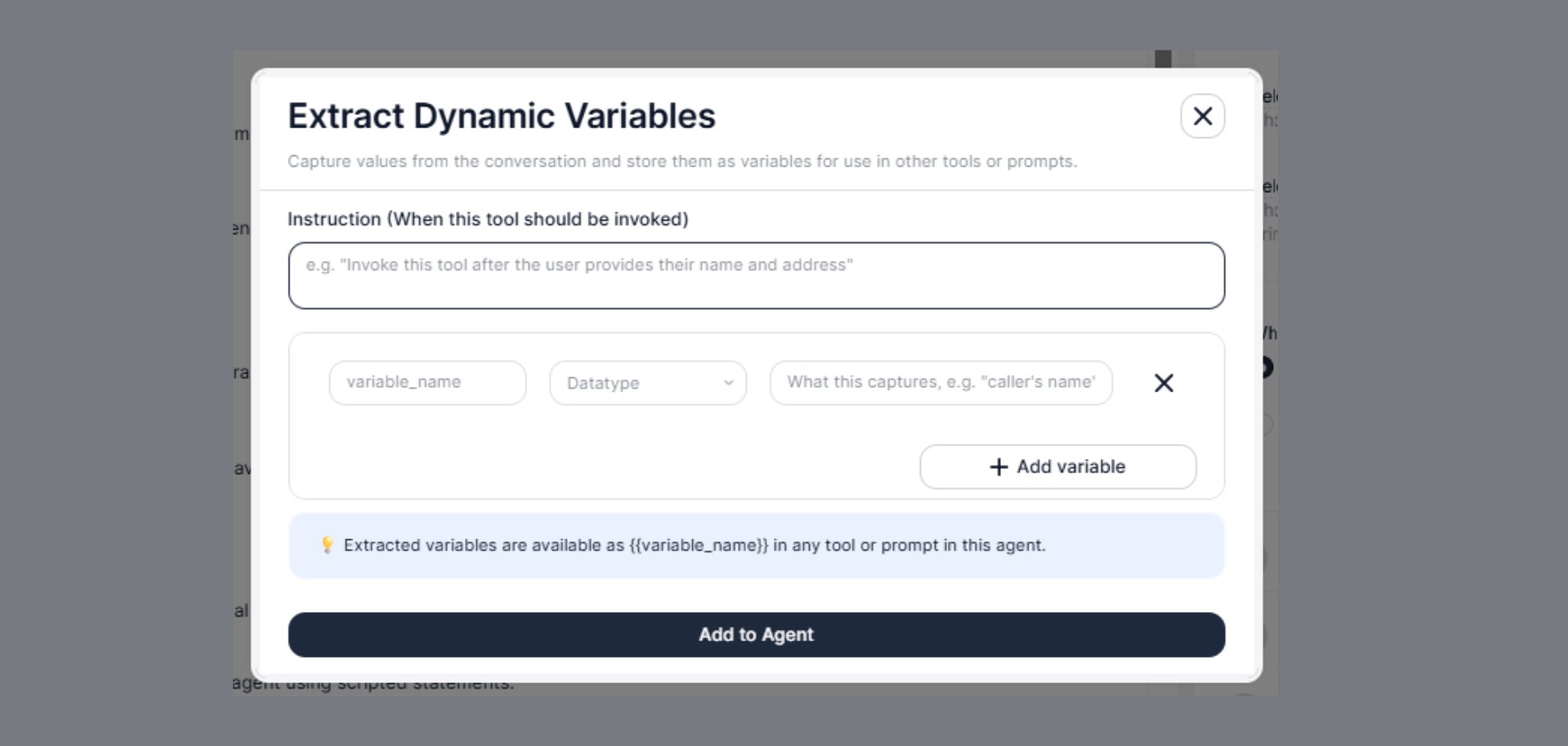
Extracted variables are available as {{variable_name}} in any tool or prompt in this agent.
When to Use
Configure this tool when your agent needs to:
- Capture a customer’s name, email, or phone number from conversation
- Store a policy number, account ID, or booking reference before an API call
- Record a preferred date, time, or department for downstream routing
- Save any value the customer provides that another tool will need later
Steps to Add
- Open the Agent Builder
- Click + Add Tool
- Select Extract Dynamic Variables from the tool menu
- A configuration modal will appear — fill in all fields (described below)
- Click Add to Agent
Configuration Fields
Write a clear instruction that tells the AI agent when to trigger the extraction. The agent reads this and decides at each turn of the conversation whether the condition has been met.
Invoke this tool after the user provides their name and address.
Extract variables once the customer confirms their policy number and preferred callback time.
Be specific about what the customer must have said before extraction happens. Vague instructions like “extract when needed” cause the tool to fire at the wrong moment.
Variables
Each variable you want to capture is defined as a row with three fields:
variable_name
The identifier you will use to reference this value everywhere else in the agent. Must be in snake_case with no spaces.
customer_name
policy_number
preferred_date
callback_number
vehicle_type
Use descriptive names that clearly state what value is stored. Avoid short or ambiguous names like val1 or x — they become confusing when used across multiple tools.
Datatype
The expected format of the captured value. Selecting the correct datatype helps the agent extract and validate the value accurately.
| Datatype | Description | Example |
|---|
string | Any text value | "John Smith", "POL-98271" |
number | Numeric value (integer or decimal) | 1200, 3.5 |
date | A calendar date | "2026-06-10" |
boolean | True or false | true, false |
When in doubt, use string — it is the most flexible and works for most values including phone numbers, IDs, and reference codes.
What this captures (description)
A short, plain-language description of exactly what this variable should contain. The agent uses this description to understand what to listen for in the conversation.
caller's name
customer's 10-digit policy number
preferred callback date
vehicle make and model
whether the customer agreed to the renewal
Write this as if you are explaining it to someone who doesn’t know the product. The clearer this is, the more accurately the agent extracts the right value.
Adding Multiple Variables
Click + Add variable to add more rows. Each row captures a different value from the conversation. You can add as many variables as needed in a single tool call.
For example, an insurance renewal agent might capture all of the following in one extraction:
| variable_name | Datatype | What this captures |
|---|
customer_name | string | caller’s full name |
policy_number | string | 8-digit policy reference number |
vehicle_reg | string | vehicle registration plate |
renewal_confirmed | boolean | whether the customer agreed to renew |
preferred_payment | string | preferred payment method (card, bank transfer) |
Once defined, variables are referenced using double curly braces throughout the agent:
They work anywhere inside the agent — in prompts, in tool instructions, in API endpoint URLs, in request body fields, and in header values.
In a prompt:
You are speaking with {{customer_name}}. Their policy number is {{policy_number}}.
In an API endpoint URL:
https://api.example.com/policies/{{policy_number}}
In a request body:
{
"name": "{{customer_name}}",
"policy": "{{policy_number}}",
"renewal": {{renewal_confirmed}}
}
The agent extracts variables at the moment the instruction condition is met — not before. This means:
- The agent listens through the conversation normally
- When the trigger condition is satisfied (e.g., customer provides their name), the tool fires
- Extracted values are immediately available to all subsequent tools and prompts in the agent
Configure the Instruction carefully to ensure extraction happens at the right point — after the customer has provided the value, not before.
Real-World Example
Scenario: An outbound insurance renewal agent that needs to confirm the customer’s identity and capture their renewal decision before making an API call.
Instruction:
Invoke this tool after the customer confirms their name and policy number,
and has given a clear yes or no to the renewal offer.
Variables:
| variable_name | Datatype | What this captures |
|---|
customer_name | string | customer’s full name as stated |
policy_number | string | policy reference number (e.g., POL-XXXXX) |
renewal_decision | boolean | whether the customer agreed to renew |
Conversation flow:
Agent: "Can I confirm your name and policy number?"
Customer: "Yes, I'm Priya Sharma. Policy number POL-44821."
Agent: "Would you like to renew your policy for another year?"
Customer: "Yes, please go ahead."
→ voice_extract_dynamic_variables fires
→ customer_name = "Priya Sharma"
→ policy_number = "POL-44821"
→ renewal_decision = true
→ Next tool (API call) uses {{customer_name}} and {{policy_number}} to update the system
Best Practices
- Use
snake_case for all variable names — no spaces, hyphens, or capital letters
- Write specific What this captures descriptions — the agent reads these literally to know what to listen for
- Add all related variables in a single tool rather than creating multiple extraction tools for the same conversation segment
Troubleshooting
| Issue | Fix |
|---|
| Variable not being extracted | Make the Instruction more specific — add explicit trigger phrases |
| Wrong value captured | Improve the What this captures description to be more precise |
| Variable shows as empty in API call | Check that the extraction tool runs before the API tool in the conversation flow |
| Agent extracts too early | Tighten the Instruction to require more of the conversation to complete first |
| How Variables Flow |
|---|
| Transfer Call | Pass {{customer_name}} and context in Whisper Message |
| Add Integration Tool | Use {{policy_number}} or {{customer_id}} in API endpoint and body |
| Navigate IVR | Route using extracted {{department_preference}} |
| End Call | Reference extracted confirmation to decide when to close |