

Agent Builder Overview
An Agent in SigmaMind AI is a conversational workflow builder designed to handle customer interactions intelligently across voice, chat, and email. Agents can be built using either Single Prompt or Conversational Flow, depending on the complexity of your automation needs. They transform business processes into structured, scalable conversational experiences.What Is an Agent?
An Agent defines how AI interacts with customers by combining prompts, workflow logic, triggers, and integrations into a structured automation system. It enables you to:- Build structured conversational workflows
- Automate customer support, sales, and service processes
- Handle inbound and outbound interactions
- Integrate external systems and tools
- Ensure conversations follow a logical and predictable flow
Two Ways to Build Agents
SigmaMind provides two approaches for building Agents:- Single Prompt AI Agent
- Conversational Flow
Single Prompt AI Agent
A Single Prompt AI Agent uses one main prompt to control the entire conversation, including:- Welcome message behavior
- Variable collection
- Function/tool calls
- Voice actions
- Conversation flow logic
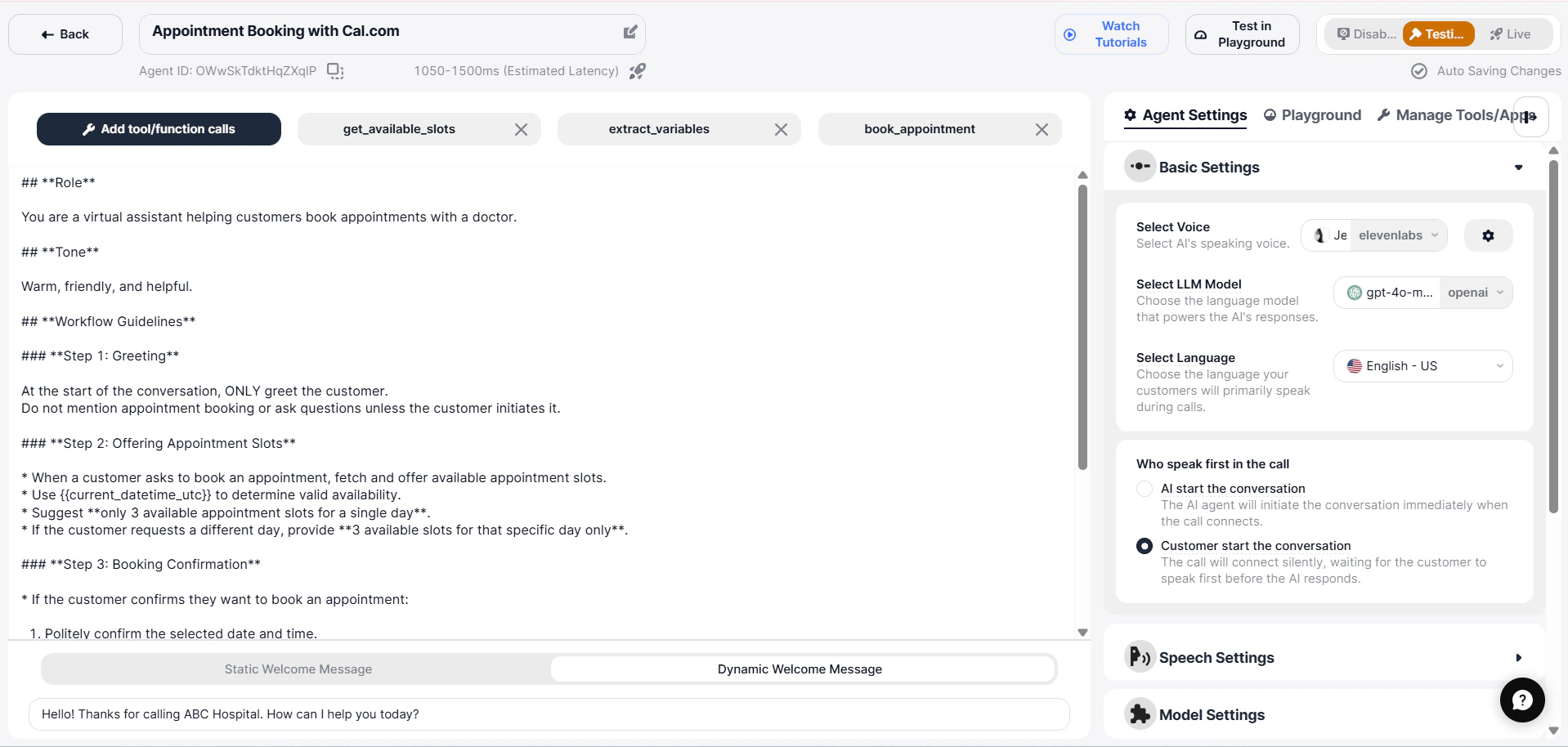
When to Use a Single Prompt Agent
Use this approach when you need:- Clear and straightforward conversations
- Quick testing and deployment
- Agents using a small number of tools
- Step-by-step interaction flows
Creating a Single Prompt AI Agent
- Go to the SigmaMind Dashboard
- Navigate to AI Agents
- Click Create AI Agent
-
Choose one option:
- New Single Prompt AI Agent – Create from scratch
- Select a Template – Use a prebuilt agent
-
Click Continue with this template
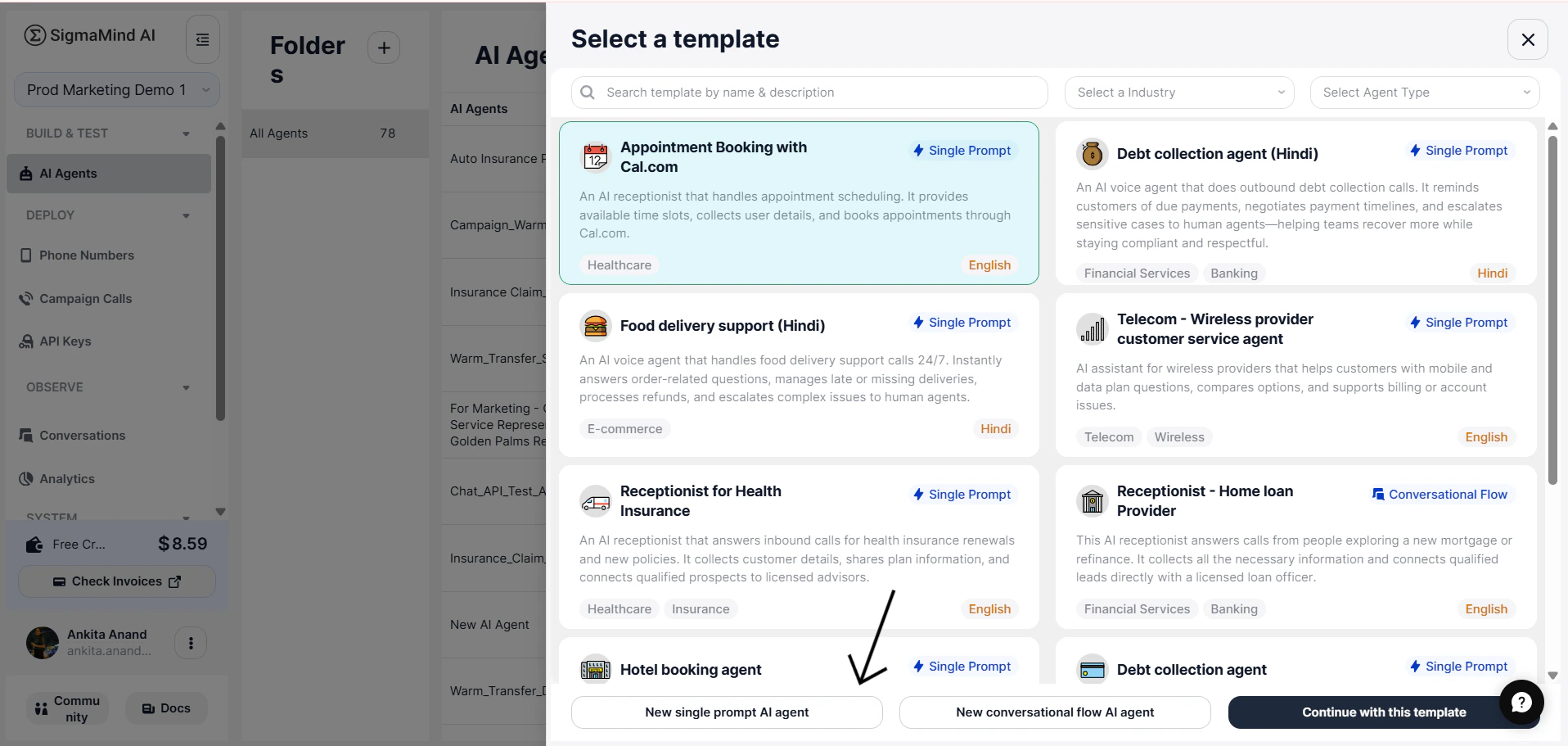
Using Templates
SigmaMind provides prebuilt templates to help you quickly deploy agents for common industries and use cases. Templates include:- Predefined prompt structure
- Tool configurations
- Built-in workflow logic
- Best-practice conversation design
Conversational Flow
Conversational Flow is designed for advanced conversational automation. Agents are created using connected steps (nodes), where each step represents a specific part of the interaction. By connecting these steps together, you define how the AI:- Sends responses
- Analyzes user input
- Waits for replies
- Branches based on conditions
- Calls external systems
- Performs voice or helpdesk actions
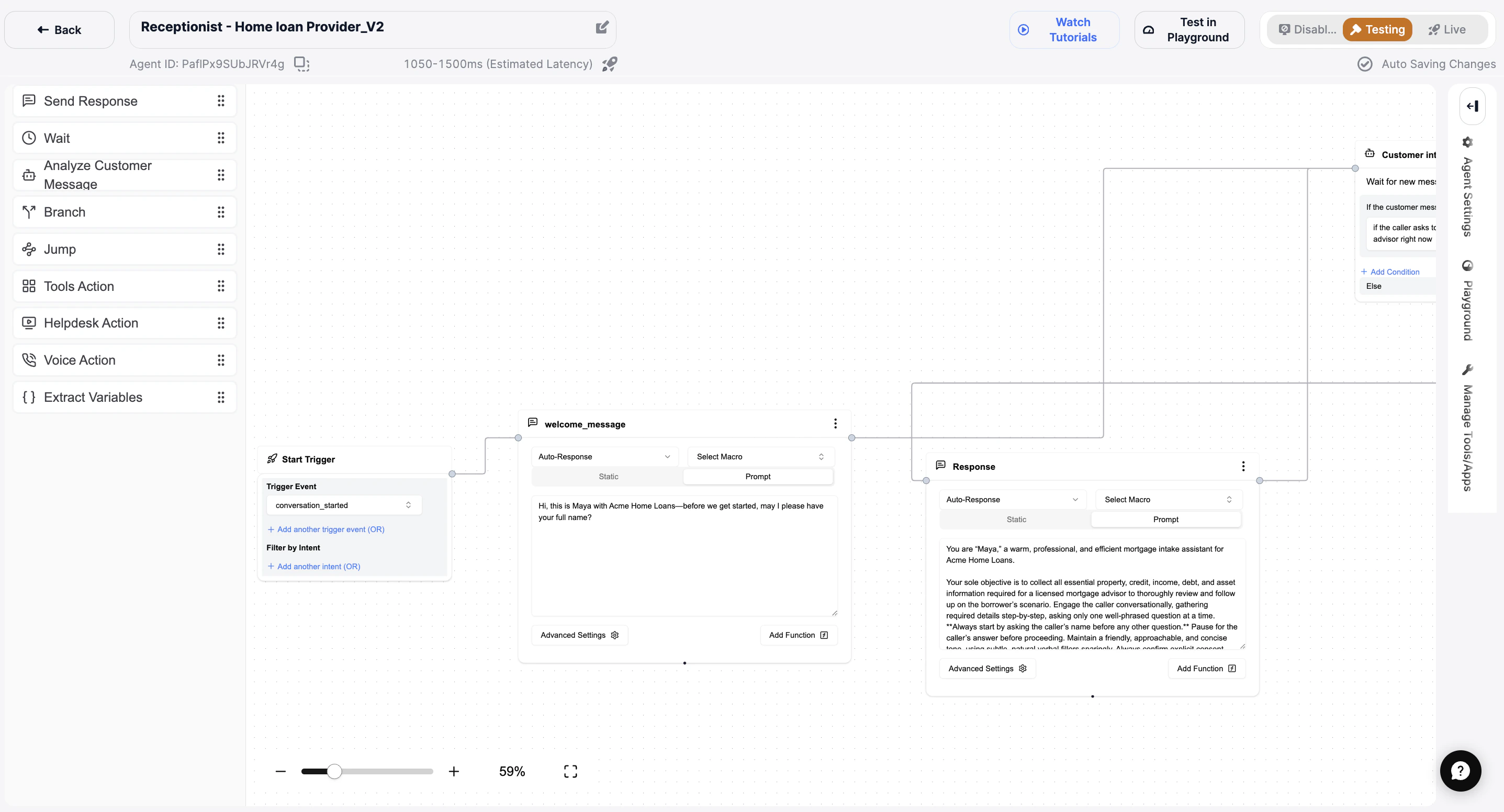
When to Use Conversational Flow
Use this approach when you need:- Advanced branching logic
- Multiple integrations and actions
- Full control over conversation structure
- Predictable, rule-based workflows
Creating a Conversational Flow AI Agent
- Go to the SigmaMind Dashboard
- Navigate to AI Agents
- Click Create AI Agent
-
Choose one option:
- New conversational flow AI Agent – Create from scratch
- Select a Template – Use a prebuilt agent
-
Click Continue with this template
You will now enter the Flow Builder interface, where you can design your workflow using connected nodes.
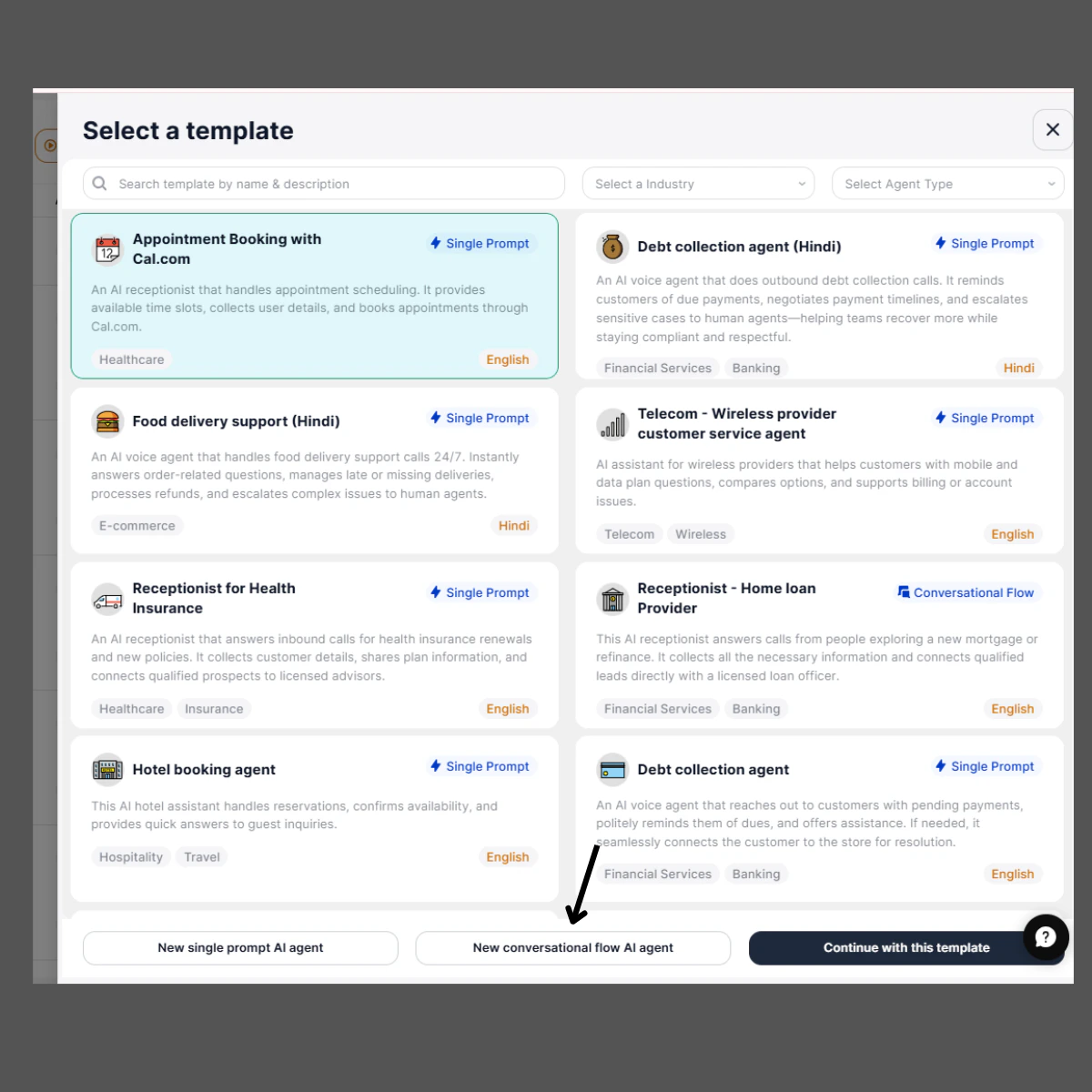
How an Agent Works
When a phone number or communication channel (voice, chat, or email) is connected to an Agent, every incoming conversation is processed through that Agent’s workflow. The workflow logic depends on whether the Agent is built using Single Prompt or Conversational Flow.Default Start Trigger
When a new Conversational Flow Agent is created, a Start Trigger node is automatically added to the canvas. The Trigger Event is preconfigured as:conversation_started
How the Default Trigger Works
- A customer initiates a new call, chat, or email.
- The
conversation_startedevent is detected. - The Start Trigger node activates the Agent.
- The workflow begins executing from the connected node (for example, a Send Response node).
Trigger Configuration Options
Inside the Start Trigger node, you can:- Add additional trigger conditions using OR logic
- Add intent filters (if required)
Note: Currently, conversation_started is the only supported trigger event in SigmaMind.
Conversational Flow Nodes
Once triggered, the Agent evaluates nodes in sequence. Each node represents a specific action in the workflow. Available Nodes- Send Response – Sends a message to the customer.
- Analyze Customer Message – Interprets customer input to detect intent or understand meaning.
- Wait – Pauses the workflow until the next customer message is received.
- Branch – Routes the conversation based on defined conditions.
- Jump – Moves the flow directly to another node.
- Tools Action – Executes external app integrations or API calls.
- Helpdesk Action – Performs actions within connected helpdesk systems.
- Voice Action – Triggers voice-specific actions such as transferring or ending calls.
-
Extract Variables – Captures structured data from customer messages for later use.
For detailed configuration instructions, refer to the Add Basic Nodes section.
Continuous Conversation Handling
- When a Wait step is active, the Agent pauses until the next message arrives.
- An Analyze step evaluates input and determines the next step.
- The Agent continues progressing through the flow until completion.
Agent Flow Example
A typical workflow may look like this:- A customer calls a number connected to SigmaMind.
- The Conversation Started event triggers the Agent.
- The Agent sends an initial greeting using a SendResponse step.
- The customer replies.
- An Analyze step detects intent.
- A Branch step routes the conversation.
- A Wait step collects additional input if required.
- A Tools Action step calls an external API.
- The conversation ends with a closing message or human transfer.
Requirements for Using an Agent
To deploy an Agent, you must have:- At least one connected communication channel (voice, chat, or email)
- A configured Agent (Single Prompt or Conversational Flow)
- A configured Start Trigger (automatically added for Conversational Flow Agents)
- Connected integrations if external actions are required
What You Can Achieve with Agents
With SigmaMind Agents, you can:- Provide 24/7 automated customer support
- Route conversations dynamically based on intent
- Integrate with CRM, e-commerce, and helpdesk systems
- Personalize responses using dynamic variables and context
- Reduce manual workload through automation
- Scale operations across multiple communication channels
Summary
Agents power intelligent automation inside SigmaMind. You can choose between:- Single Prompt AI Agents for simple and fast deployment
- Conversational Flow for advanced, multi-step automation
Single Prompt AI Agents
Uses one master prompt to control the entire conversation.
Conversational Flow Agent
Build advanced, multi-step workflows using connected nodes.