Documentation Index

Fetch the complete documentation index at: https://docs.sigmamind.ai/llms.txt

Use this file to discover all available pages before exploring further.

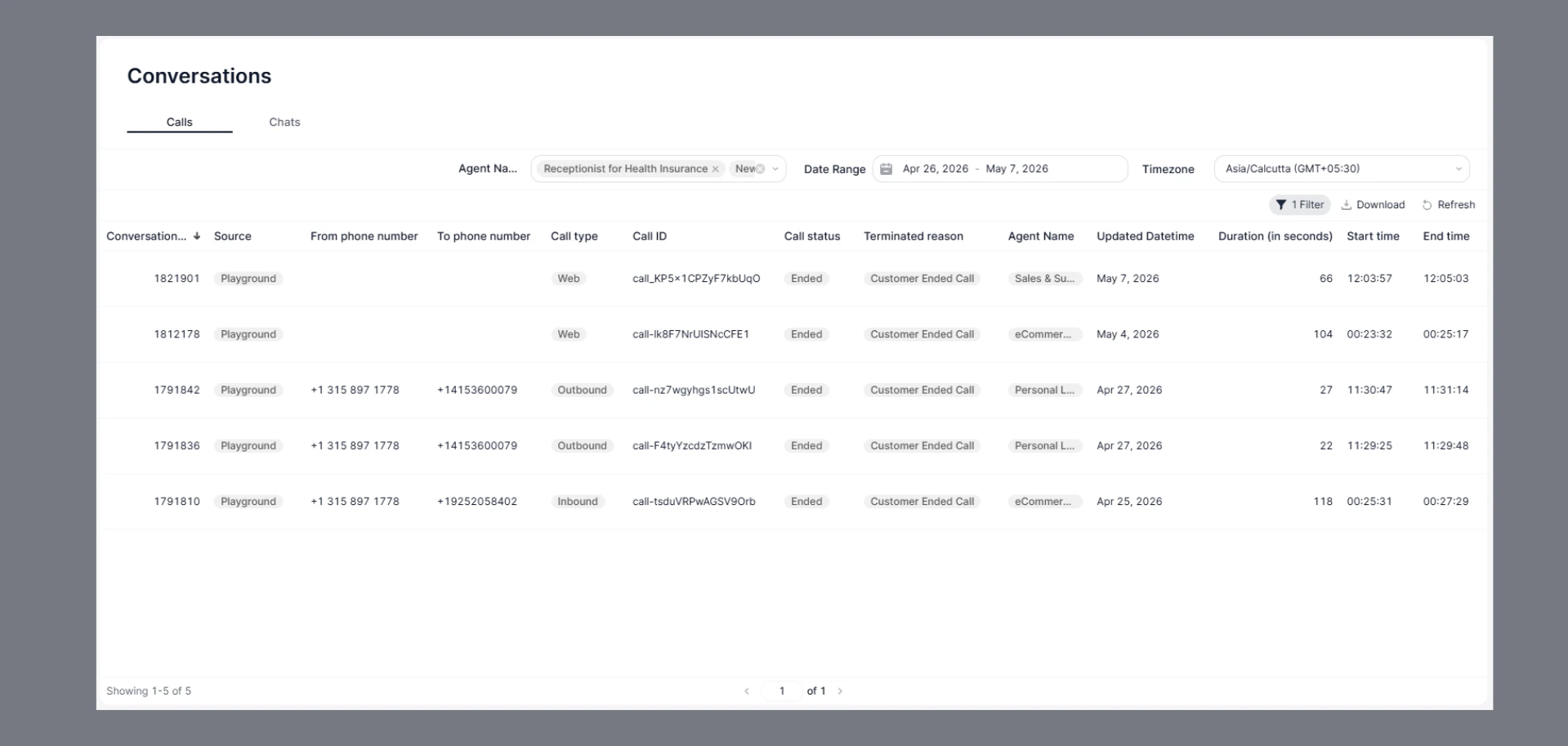
The Conversation page provides a complete history of all inbound, outbound, and web calls handled through the platform. It helps track call activity, monitor agent performance, and review conversation details. The Calls tab under Conversations displays all voice and web call interactions handled by your AI agents. Use this page to track call outcomes, review durations, and investigate individual sessions.
Calllogs

How to Navigate

  1. Go to the Home Dashboard.
  2. From the left side panel, click on Conversations.
  3. Open the Calls tab at the top of the page.

Filters

Use the filter bar at the top to narrow down your call list:
FilterDescription
Agent NameFilter by one or more agents (e.g., Receptionist for Health Insurance, New AI)
Date RangeSet a custom start and end date (e.g., Apr 26, 2026 – May 8, 2026)
TimezoneChoose your preferred timezone for all timestamps (e.g., Asia/Calcutta GMT+05:30)
Click 1 Filter to view or clear any active filters. Use Download to export the current view as a CSV. Click Refresh to reload the latest data.

Calls Table

Each row represents a single call interaction. The table includes the following columns:
ColumnDescription
Conversation_IDUnique numeric identifier for the conversation
SourceOrigin of the call (e.g., Playground)
From phone numberCaller’s phone number — populated for Outbound calls
To phone numberRecipient’s phone number — populated for Outbound calls
Call typeType of call — Chat, Web, or Outbound
Call IDUnique string identifier for the call session
Call statusCurrent status of the call (e.g., Ended)
Terminated reasonHow the call ended — Agent Ended Call or Customer Ended Call
Agent NameThe AI agent that handled the call
Updated DatetimeDate when the conversation record was last updated
Duration (in seconds)Total length of the call in seconds
Start timeTimestamp when the call began
End timeTimestamp when the call ended

Call Types

Chat

Text-based sessions initiated through the Playground interface. Duration is typically 0 seconds as these are non-voice interactions.

Web

Calls initiated via a web embed or widget by a customer visiting your site or app.

Outbound

Calls placed by the AI agent to a customer’s phone number. Both From and To phone numbers are populated.

Terminated Reasons

ReasonDescription
Agent Ended CallThe AI agent terminated the conversation
Customer Ended CallThe customer or user ended the conversation

FAQs

Chat-type calls (text sessions in the Playground) show a duration of 0 seconds because they are not voice calls — there is no audio duration to measure.
Playground indicates the call was initiated from the SigmaMind Playground testing environment, not a live production deployment.
Use the Agent Name and Date Range filters together to narrow results. You can also sort by Conversation_ID (descending) to see the most recent calls first.
Duration-based filtering is not available in the UI. Download the data and apply duration filters in a spreadsheet tool like Excel or Google Sheets.