> ## Documentation Index
> Fetch the complete documentation index at: https://docs.sigmamind.ai/llms.txt
> Use this file to discover all available pages before exploring further.
# Workspace
## Manage Your Workspace and Team in SigmaMind AI
Create workspaces, invite members, and control access all in one place.
## Create a New Workspace
## Steps
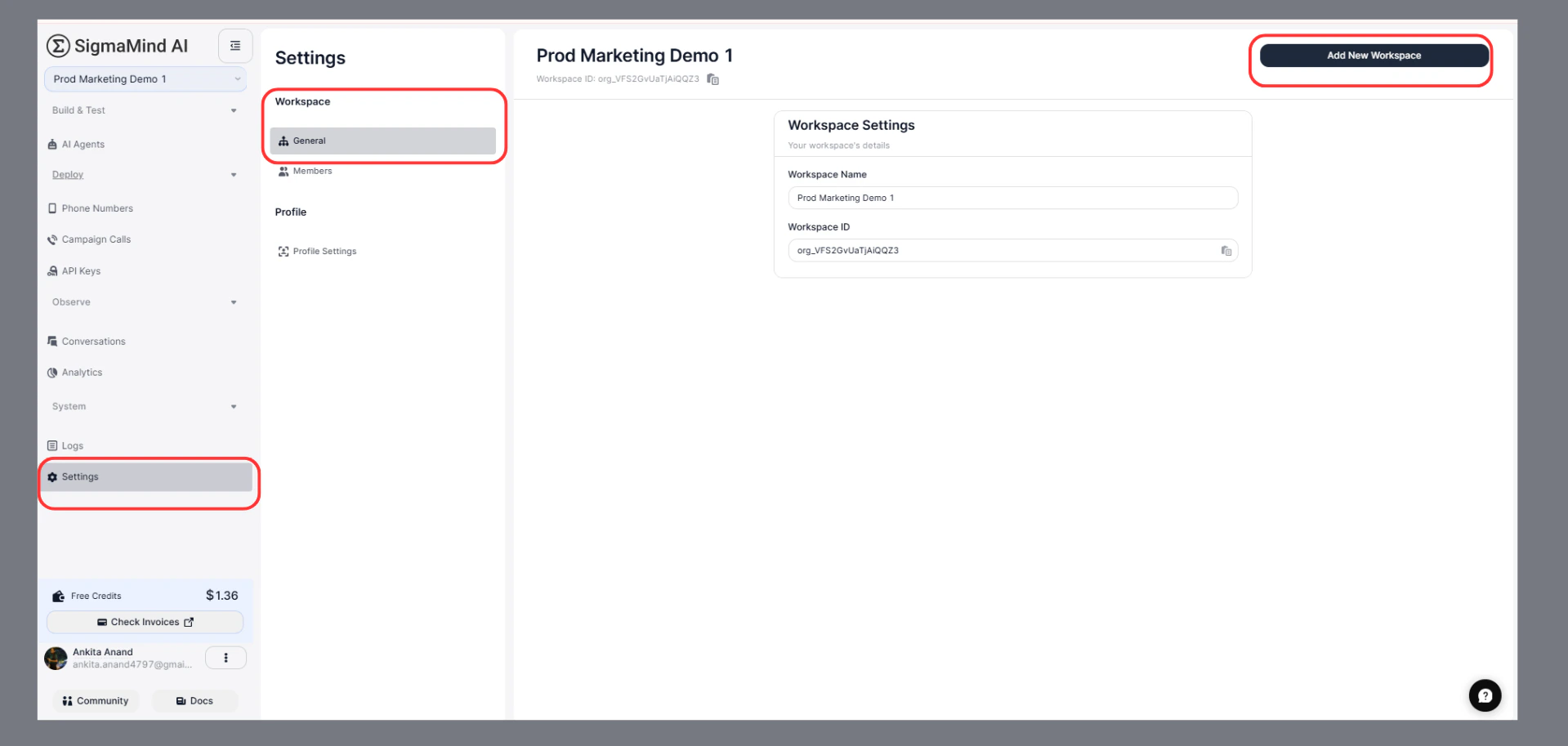
1. From the dashboard, click on the **Settings**
2. Click **“Add New Workspace”**
3. Enter the **Workspace Name**
4. Click **“Create Workspace”**
 ***
## What Happens Next
* The workspace is created instantly
* You are added as an **Admin**
* You can switch between workspaces anytime
***
### View Workspace Details
### Steps
1. Go to **Settings**
2. Click on **Workspace → General**
## Details Available
* **Workspace Name** (editable)
* **Workspace ID** (auto-generated, read-only)
***
## What Happens Next
* The workspace is created instantly
* You are added as an **Admin**
* You can switch between workspaces anytime
***
### View Workspace Details
### Steps
1. Go to **Settings**
2. Click on **Workspace → General**
## Details Available
* **Workspace Name** (editable)
* **Workspace ID** (auto-generated, read-only)