> ## Documentation Index
> Fetch the complete documentation index at: https://docs.sigmamind.ai/llms.txt
> Use this file to discover all available pages before exploring further.
# End Call
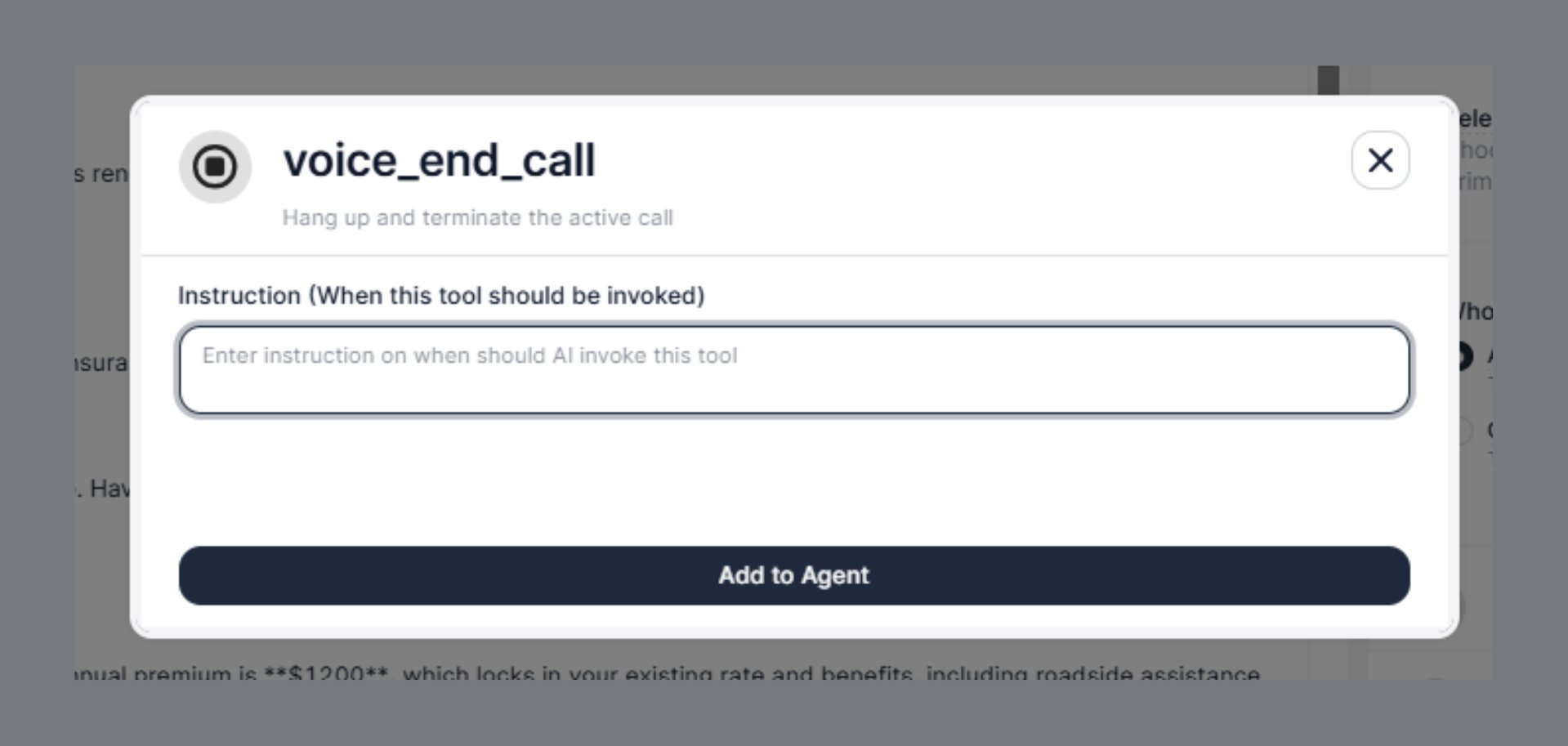
The **End Call** tool allows your AI agent to terminate an active call programmatically — cleanly, professionally, and at exactly the right moment. Instead of leaving the call open indefinitely or relying on the customer to hang up, your agent can close the conversation gracefully once its job is done.
 ***
## Steps to Add
1. Open the **Agent Builder**
2. Click **+ Add Tool**
3. Select **End Call**
4. Fill in the **Instruction** field (described below)
5. Click **Add to Agent**
***
## Configuration Field
### Instruction *(When this tool should be invoked)*
This is the only configuration field for End Call — and it is the most important one.
The Instruction tells the AI agent **exactly when** it should hang up and terminate the call. The agent reads this instruction alongside the conversation context and decides at each turn whether the end condition has been met.
```text theme={null}
Enter instruction on when should AI invoke this tool
```
Write this as a clear, specific trigger condition — not a vague directive. The agent follows the instruction literally, so precision matters.
***
## Why the Instruction Field Matters
Without a well-written instruction, the agent either:
* **Ends calls too early** — cutting off a customer mid-sentence because a vague condition matched prematurely
* **Leaves calls open too long** — the conversation is finished but the agent keeps listening, wasting time and creating an awkward silence
A good instruction defines the **exact state of the conversation** at which hanging up is the right action.
***
## Instruction Writing Guide
### 1. End after task completion
Use this when the agent's primary goal has been accomplished and there is nothing left to do.
```text theme={null}
Call voice_end_call after the customer confirms their policy renewal and you have
provided the confirmation number.
```
```text theme={null}
End the call once the appointment has been successfully booked and the customer
has acknowledged the date and time.
```
```text theme={null}
Hang up after the customer confirms they have received the OTP and no further
assistance is needed.
```
***
### 2. End when the customer declines or is not interested
Use this for outbound calling scenarios — insurance renewals, campaigns, sales calls — where customers may not want to continue.
```text theme={null}
End the call if the customer says they are not interested, asks to be removed
from the list, or says "no thanks", "not now", "don't call again", or similar.
```
```text theme={null}
Call voice_end_call when the customer declines the renewal offer or says they
will call back later.
```
This prevents the agent from continuing to pitch or ask follow-up questions after a clear rejection, which would feel pushy and damage the customer experience.
***
### 3. End when the customer says goodbye
The most natural trigger — the customer signals the conversation is over.
```text theme={null}
End the call when the customer says goodbye, "thank you", "that's all",
"I'm done", or any other closing phrase that signals they are finished.
```
```text theme={null}
Hang up when the customer thanks you and there are no remaining open questions
or pending actions.
```
***
### 4. End when the customer is frustrated or unresponsive
Continuing a conversation with an angry or silent customer makes things worse. A graceful exit is the better outcome.
```text theme={null}
End the call if the customer becomes abusive, repeatedly asks to be left alone,
or is clearly not willing to continue the conversation.
```
```text theme={null}
Call voice_end_call if there is no response from the customer for more than
10 seconds after asking a question twice.
```
***
### 5. End after a successful transfer
Once a transfer has been initiated, the AI has completed its role. You can optionally add a closing line before terminating.
```text theme={null}
After successfully transferring the call to a human agent, end this AI session.
```
> Note: When using **Warm Transfer**, the AI drops off automatically once the bridge is established. Use `voice_end_call` for **Cold Transfer** scenarios or when the transfer fails and the AI needs to close out cleanly.
***
### 6. End on specific call outcomes *(outbound campaigns)*
For outbound calls — renewals, reminders, collections — combine end conditions into a single instruction:
```text theme={null}
End the call in any of the following situations:
- The customer confirms the renewal
- The customer declines the offer
- The customer asks to call back and you have logged the callback request
- The customer is not reachable (voicemail, no answer after greeting)
- The customer has provided all required information
```
***
## Combining Instruction with a Farewell
The `voice_end_call` tool terminates the call. To make the ending feel natural, write your agent's **closing line** in the main system prompt — not in the End Call instruction itself.
**In your main agent prompt:**
```text theme={null}
Before ending the call, always say a closing message such as:
"Thank you for your time. Have a great day!" or
"Your renewal is confirmed. We'll send a confirmation to your email. Goodbye!"
```
**In the End Call instruction:**
```text theme={null}
Call voice_end_call after delivering the closing message and the customer
acknowledges or the conversation reaches a natural stopping point.
```
This separation keeps the agent prompt responsible for **what to say** and the End Call tool responsible for **when to hang up**.
***
## Real-World Examples by Use Case
### Insurance Renewal Bot
```text theme={null}
Call voice_end_call in the following situations:
- The customer confirms the renewal and you have shared the confirmation details
- The customer declines the renewal offer
- The customer says they will call back or need more time
- The customer asks to be removed from the call list
- The customer says goodbye or thanks you and ends the conversation
```
### Appointment Booking Agent
```text theme={null}
End the call after:
- The appointment has been confirmed and the customer has acknowledged the slot
- The customer cancels and no rebooking is requested
- The customer says "that's all" or "I'm done"
```
### Collections / Payment Reminder Agent
```text theme={null}
Call voice_end_call when:
- The customer confirms the payment has been made
- The customer requests a callback and you have recorded the preferred time
- The customer disputes the amount and has been transferred to the billing team
- The customer refuses to engage and asks to end the call
```
### Outbound Survey Agent
```text theme={null}
End the call after the customer completes all survey questions and you have
confirmed their responses. Also end the call if the customer refuses to
participate or asks to opt out at any point.
```
***
## Common Mistakes to Avoid
| Mistake | Why It's a Problem | Better Approach |
| ----------------------------------- | ---------------------------------------------------- | ------------------------------------------------------------------------ |
| `"End the call when done"` | Too vague — agent doesn't know what "done" means | Define the specific completion state |
| `"End after silence"` | Silence can happen mid-sentence or during thinking | Specify duration: `"no response for 10+ seconds after two prompts"` |
| `"End after saying goodbye"` | Agent may say goodbye before tasks are completed | Add: `"only after all tasks are complete and customer acknowledges"` |
| Not adding End Call at all | Call stays open indefinitely after conversation ends | Always add `voice_end_call` to every agent |
| Multiple conflicting end conditions | Agent may end calls at wrong moments | Order conditions by priority or use clear "any of the following" framing |
***
## Best Practices
* **Always add `voice_end_call` to every agent** — without it, the call will not terminate automatically after the conversation ends
* Write **specific, observable trigger conditions** — the agent needs to match language or conversation state, not guess intent
* **Separate farewell language from the end trigger** — put closing messages in the main prompt, not in this instruction
* For outbound agents, **list multiple end conditions** — customers can end calls in many different ways
* Combine with **voice\_transfer\_call** — if a transfer is attempted and fails, `voice_end_call` ensures the call doesn't stay open in a broken state
* Test end-of-call behavior in the **Test Voice** playground to confirm the agent terminates correctly across different conversation paths
***
## Example Configuration
| Field | Value |
| ----------- | ----------------------------------------------------------------------------------------------------------------------------------- |
| Tool | `voice_end_call` |
| Instruction | End the call after the customer confirms their renewal, declines the offer, says goodbye, or asks to be removed from the call list. |
***
## Troubleshooting
| Issue | Fix |
| --------------------------------- | --------------------------------------------------------------------------------------- |
| Call never ends automatically | Confirm `voice_end_call` is added to the agent and the instruction is filled in |
| Agent ends call too early | Make the instruction more specific — add conditions that must all be true before ending |
| Agent ends call mid-sentence | Loosen the trigger — the current instruction may be matching too broadly |
| Awkward silence before hangup | Add a farewell message in the main agent prompt before the end condition is checked |
| Agent keeps talking after goodbye | Add `"customer says goodbye"` explicitly to the end condition list |
***
***
## Steps to Add
1. Open the **Agent Builder**
2. Click **+ Add Tool**
3. Select **End Call**
4. Fill in the **Instruction** field (described below)
5. Click **Add to Agent**
***
## Configuration Field
### Instruction *(When this tool should be invoked)*
This is the only configuration field for End Call — and it is the most important one.
The Instruction tells the AI agent **exactly when** it should hang up and terminate the call. The agent reads this instruction alongside the conversation context and decides at each turn whether the end condition has been met.
```text theme={null}
Enter instruction on when should AI invoke this tool
```
Write this as a clear, specific trigger condition — not a vague directive. The agent follows the instruction literally, so precision matters.
***
## Why the Instruction Field Matters
Without a well-written instruction, the agent either:
* **Ends calls too early** — cutting off a customer mid-sentence because a vague condition matched prematurely
* **Leaves calls open too long** — the conversation is finished but the agent keeps listening, wasting time and creating an awkward silence
A good instruction defines the **exact state of the conversation** at which hanging up is the right action.
***
## Instruction Writing Guide
### 1. End after task completion
Use this when the agent's primary goal has been accomplished and there is nothing left to do.
```text theme={null}
Call voice_end_call after the customer confirms their policy renewal and you have
provided the confirmation number.
```
```text theme={null}
End the call once the appointment has been successfully booked and the customer
has acknowledged the date and time.
```
```text theme={null}
Hang up after the customer confirms they have received the OTP and no further
assistance is needed.
```
***
### 2. End when the customer declines or is not interested
Use this for outbound calling scenarios — insurance renewals, campaigns, sales calls — where customers may not want to continue.
```text theme={null}
End the call if the customer says they are not interested, asks to be removed
from the list, or says "no thanks", "not now", "don't call again", or similar.
```
```text theme={null}
Call voice_end_call when the customer declines the renewal offer or says they
will call back later.
```
This prevents the agent from continuing to pitch or ask follow-up questions after a clear rejection, which would feel pushy and damage the customer experience.
***
### 3. End when the customer says goodbye
The most natural trigger — the customer signals the conversation is over.
```text theme={null}
End the call when the customer says goodbye, "thank you", "that's all",
"I'm done", or any other closing phrase that signals they are finished.
```
```text theme={null}
Hang up when the customer thanks you and there are no remaining open questions
or pending actions.
```
***
### 4. End when the customer is frustrated or unresponsive
Continuing a conversation with an angry or silent customer makes things worse. A graceful exit is the better outcome.
```text theme={null}
End the call if the customer becomes abusive, repeatedly asks to be left alone,
or is clearly not willing to continue the conversation.
```
```text theme={null}
Call voice_end_call if there is no response from the customer for more than
10 seconds after asking a question twice.
```
***
### 5. End after a successful transfer
Once a transfer has been initiated, the AI has completed its role. You can optionally add a closing line before terminating.
```text theme={null}
After successfully transferring the call to a human agent, end this AI session.
```
> Note: When using **Warm Transfer**, the AI drops off automatically once the bridge is established. Use `voice_end_call` for **Cold Transfer** scenarios or when the transfer fails and the AI needs to close out cleanly.
***
### 6. End on specific call outcomes *(outbound campaigns)*
For outbound calls — renewals, reminders, collections — combine end conditions into a single instruction:
```text theme={null}
End the call in any of the following situations:
- The customer confirms the renewal
- The customer declines the offer
- The customer asks to call back and you have logged the callback request
- The customer is not reachable (voicemail, no answer after greeting)
- The customer has provided all required information
```
***
## Combining Instruction with a Farewell
The `voice_end_call` tool terminates the call. To make the ending feel natural, write your agent's **closing line** in the main system prompt — not in the End Call instruction itself.
**In your main agent prompt:**
```text theme={null}
Before ending the call, always say a closing message such as:
"Thank you for your time. Have a great day!" or
"Your renewal is confirmed. We'll send a confirmation to your email. Goodbye!"
```
**In the End Call instruction:**
```text theme={null}
Call voice_end_call after delivering the closing message and the customer
acknowledges or the conversation reaches a natural stopping point.
```
This separation keeps the agent prompt responsible for **what to say** and the End Call tool responsible for **when to hang up**.
***
## Real-World Examples by Use Case
### Insurance Renewal Bot
```text theme={null}
Call voice_end_call in the following situations:
- The customer confirms the renewal and you have shared the confirmation details
- The customer declines the renewal offer
- The customer says they will call back or need more time
- The customer asks to be removed from the call list
- The customer says goodbye or thanks you and ends the conversation
```
### Appointment Booking Agent
```text theme={null}
End the call after:
- The appointment has been confirmed and the customer has acknowledged the slot
- The customer cancels and no rebooking is requested
- The customer says "that's all" or "I'm done"
```
### Collections / Payment Reminder Agent
```text theme={null}
Call voice_end_call when:
- The customer confirms the payment has been made
- The customer requests a callback and you have recorded the preferred time
- The customer disputes the amount and has been transferred to the billing team
- The customer refuses to engage and asks to end the call
```
### Outbound Survey Agent
```text theme={null}
End the call after the customer completes all survey questions and you have
confirmed their responses. Also end the call if the customer refuses to
participate or asks to opt out at any point.
```
***
## Common Mistakes to Avoid
| Mistake | Why It's a Problem | Better Approach |
| ----------------------------------- | ---------------------------------------------------- | ------------------------------------------------------------------------ |
| `"End the call when done"` | Too vague — agent doesn't know what "done" means | Define the specific completion state |
| `"End after silence"` | Silence can happen mid-sentence or during thinking | Specify duration: `"no response for 10+ seconds after two prompts"` |
| `"End after saying goodbye"` | Agent may say goodbye before tasks are completed | Add: `"only after all tasks are complete and customer acknowledges"` |
| Not adding End Call at all | Call stays open indefinitely after conversation ends | Always add `voice_end_call` to every agent |
| Multiple conflicting end conditions | Agent may end calls at wrong moments | Order conditions by priority or use clear "any of the following" framing |
***
## Best Practices
* **Always add `voice_end_call` to every agent** — without it, the call will not terminate automatically after the conversation ends
* Write **specific, observable trigger conditions** — the agent needs to match language or conversation state, not guess intent
* **Separate farewell language from the end trigger** — put closing messages in the main prompt, not in this instruction
* For outbound agents, **list multiple end conditions** — customers can end calls in many different ways
* Combine with **voice\_transfer\_call** — if a transfer is attempted and fails, `voice_end_call` ensures the call doesn't stay open in a broken state
* Test end-of-call behavior in the **Test Voice** playground to confirm the agent terminates correctly across different conversation paths
***
## Example Configuration
| Field | Value |
| ----------- | ----------------------------------------------------------------------------------------------------------------------------------- |
| Tool | `voice_end_call` |
| Instruction | End the call after the customer confirms their renewal, declines the offer, says goodbye, or asks to be removed from the call list. |
***
## Troubleshooting
| Issue | Fix |
| --------------------------------- | --------------------------------------------------------------------------------------- |
| Call never ends automatically | Confirm `voice_end_call` is added to the agent and the instruction is filled in |
| Agent ends call too early | Make the instruction more specific — add conditions that must all be true before ending |
| Agent ends call mid-sentence | Loosen the trigger — the current instruction may be matching too broadly |
| Awkward silence before hangup | Add a farewell message in the main agent prompt before the end condition is checked |
| Agent keeps talking after goodbye | Add `"customer says goodbye"` explicitly to the end condition list |
***