> ## Documentation Index
> Fetch the complete documentation index at: https://docs.sigmamind.ai/llms.txt
> Use this file to discover all available pages before exploring further.
# Calls Logs
The Conversation page provides a complete history of all inbound, outbound, and web calls handled through the platform. It helps track call activity, monitor agent performance, and review conversation details.
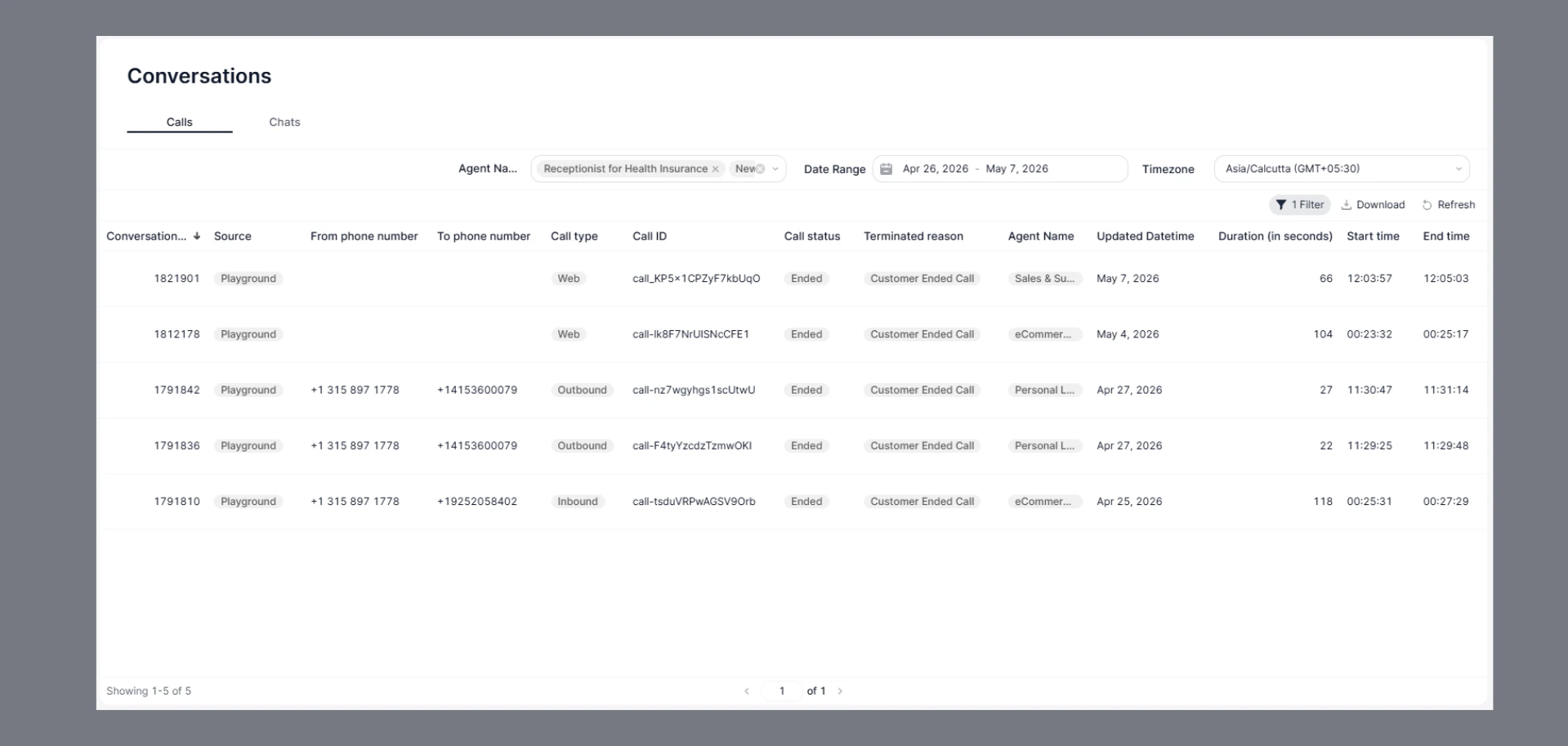
The **Calls** tab under Conversations displays all voice and web call interactions handled by your AI agents. Use this page to track call outcomes, review durations, and investigate individual sessions.
 ## How to Navigate
1. Go to the Home Dashboard.
2. From the left side panel, click on **Conversations**.
3. Open the **Calls** tab at the top of the page.
***
## Filters
Use the filter bar at the top to narrow down your call list:
| Filter | Description |
| -------------- | ---------------------------------------------------------------------------------- |
| **Agent Name** | Filter by one or more agents (e.g., *Receptionist for Health Insurance*, *New AI*) |
| **Date Range** | Set a custom start and end date (e.g., Apr 26, 2026 – May 8, 2026) |
| **Timezone** | Choose your preferred timezone for all timestamps (e.g., Asia/Calcutta GMT+05:30) |
Click **1 Filter** to view or clear any active filters. Use **Download** to export the current view as a CSV. Click **Refresh** to reload the latest data.
***
## Calls Table
Each row represents a single call interaction. The table includes the following columns:
| Column | Description |
| ------------------------- | ---------------------------------------------------------------- |
| **Conversation\_ID** | Unique numeric identifier for the conversation |
| **Source** | Origin of the call (e.g., *Playground*) |
| **From phone number** | Caller's phone number — populated for Outbound calls |
| **To phone number** | Recipient's phone number — populated for Outbound calls |
| **Call type** | Type of call — `Chat`, `Web`, or `Outbound` |
| **Call ID** | Unique string identifier for the call session |
| **Call status** | Current status of the call (e.g., `Ended`) |
| **Terminated reason** | How the call ended — `Agent Ended Call` or `Customer Ended Call` |
| **Agent Name** | The AI agent that handled the call |
| **Updated Datetime** | Date when the conversation record was last updated |
| **Duration (in seconds)** | Total length of the call in seconds |
| **Start time** | Timestamp when the call began |
| **End time** | Timestamp when the call ended |
***
## Call Types
Text-based sessions initiated through the Playground interface. Duration is typically `0` seconds as these are non-voice interactions.
Calls initiated via a web embed or widget by a customer visiting your site or app.
Calls placed by the AI agent to a customer's phone number. Both `From` and `To` phone numbers are populated.
***
## Terminated Reasons
| Reason | Description |
| --------------------- | ------------------------------------------- |
| `Agent Ended Call` | The AI agent terminated the conversation |
| `Customer Ended Call` | The customer or user ended the conversation |
## FAQs
Chat-type calls (text sessions in the Playground) show a duration of `0` seconds because they are not voice calls — there is no audio duration to measure.
*Playground* indicates the call was initiated from the SigmaMind Playground testing environment, not a live production deployment.
Use the **Agent Name** and **Date Range** filters together to narrow results. You can also sort by **Conversation\_ID** (descending) to see the most recent calls first.
Duration-based filtering is not available in the UI. Download the data and apply duration filters in a spreadsheet tool like Excel or Google Sheets.
## How to Navigate
1. Go to the Home Dashboard.
2. From the left side panel, click on **Conversations**.
3. Open the **Calls** tab at the top of the page.
***
## Filters
Use the filter bar at the top to narrow down your call list:
| Filter | Description |
| -------------- | ---------------------------------------------------------------------------------- |
| **Agent Name** | Filter by one or more agents (e.g., *Receptionist for Health Insurance*, *New AI*) |
| **Date Range** | Set a custom start and end date (e.g., Apr 26, 2026 – May 8, 2026) |
| **Timezone** | Choose your preferred timezone for all timestamps (e.g., Asia/Calcutta GMT+05:30) |
Click **1 Filter** to view or clear any active filters. Use **Download** to export the current view as a CSV. Click **Refresh** to reload the latest data.
***
## Calls Table
Each row represents a single call interaction. The table includes the following columns:
| Column | Description |
| ------------------------- | ---------------------------------------------------------------- |
| **Conversation\_ID** | Unique numeric identifier for the conversation |
| **Source** | Origin of the call (e.g., *Playground*) |
| **From phone number** | Caller's phone number — populated for Outbound calls |
| **To phone number** | Recipient's phone number — populated for Outbound calls |
| **Call type** | Type of call — `Chat`, `Web`, or `Outbound` |
| **Call ID** | Unique string identifier for the call session |
| **Call status** | Current status of the call (e.g., `Ended`) |
| **Terminated reason** | How the call ended — `Agent Ended Call` or `Customer Ended Call` |
| **Agent Name** | The AI agent that handled the call |
| **Updated Datetime** | Date when the conversation record was last updated |
| **Duration (in seconds)** | Total length of the call in seconds |
| **Start time** | Timestamp when the call began |
| **End time** | Timestamp when the call ended |
***
## Call Types
Text-based sessions initiated through the Playground interface. Duration is typically `0` seconds as these are non-voice interactions.
Calls initiated via a web embed or widget by a customer visiting your site or app.
Calls placed by the AI agent to a customer's phone number. Both `From` and `To` phone numbers are populated.
***
## Terminated Reasons
| Reason | Description |
| --------------------- | ------------------------------------------- |
| `Agent Ended Call` | The AI agent terminated the conversation |
| `Customer Ended Call` | The customer or user ended the conversation |
## FAQs
Chat-type calls (text sessions in the Playground) show a duration of `0` seconds because they are not voice calls — there is no audio duration to measure.
*Playground* indicates the call was initiated from the SigmaMind Playground testing environment, not a live production deployment.
Use the **Agent Name** and **Date Range** filters together to narrow results. You can also sort by **Conversation\_ID** (descending) to see the most recent calls first.
Duration-based filtering is not available in the UI. Download the data and apply duration filters in a spreadsheet tool like Excel or Google Sheets.