> ## Documentation Index
> Fetch the complete documentation index at: https://docs.sigmamind.ai/llms.txt
> Use this file to discover all available pages before exploring further.
# Receive Calls
> Different agents often need to share the same phone number, and Inbound calls frequently require context based on who's calling. For outbound calls and chats, you can easily provide this call-specific information through the API when initiating contact. However, inbound calls are initiated by others, so you need a mechanism to receive notifications when they arrive and process them accordingly. For this we have Inbound webhook which serves this exact purpose. Once configured, it allows you to customize the agent ID and set dynamic variables. This webhook is configured as part of your phone number settings and works with both purchased and imported numbers. When the webhook response is not received yet, the call will stay in ringing state.
## Use cases
* Add context (dynamic variables) to inbound calls.
* Override the agent id.
* Inbound call system records.
## Dashboard
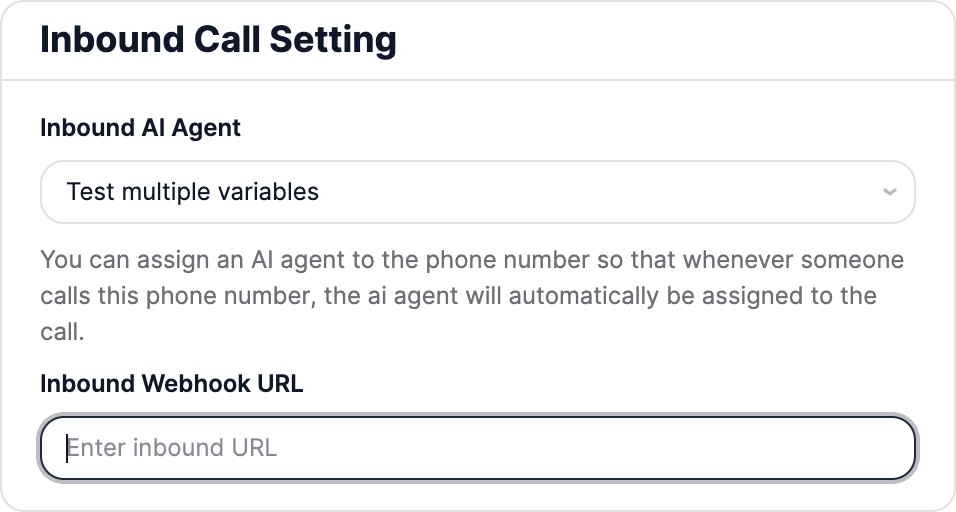
You can set the inbound call webhook url from the **SigmaMind Dashboard**. Head over to the **Phone Numbers** section, and under **Inbound Call Settings** you will see the option to set the **Inbound Webhook URL.**
 ## Webhook specifications
The webhook sends a `POST` request to your endpoint and waits up to 10 seconds for a response. If no successful response is returned within that period, the system will retry the request up to 3 additional times. If a successfull response is not received after 3 retrials then the call will not be connected to the agent.
## Request payload
The payload will include the following fields :
* `event`: the event which triggered the webhook ("inbound\_call" in this case).
* `agent_id`: appears when an inbound agent ID is configured for the number.
* `from_number`: identifies the caller so you can process the call or SMS appropriately.
* `to_number`: identifies the recipient so you can process the call or SMS appropriately.
```json theme={null}
{
"event": "inbound_call",
"agent_id":"shvb5xs5fo2D2222",
"from_number": "+12345678912",
"to_number": "+12345678913"
}
```
## Response
Your endpoint should return a JSON response with a 2xx status code, containing upto 2 optional fields. The following fields are available:
* `dynamic_variables`: use this to define dynamic variables specific to this inbound call.
* `override_agent_id`: if you want to override the agent id, you can set it here.
Here’s a sample response for inbound call:
```json theme={null}
{
"dynamic_variables": {
"first_name": "Jim",
"last_name": "Smith"
},
"override_agent_id":"shvb5xs5fo2D2225"
}
```
## FAQ
The call would remain in a ringing state.
The webhook waits up to 10 seconds for a response. If no successful response is returned within that period, the system will retry the request up to 3 additional times. If a successfull response is not received after 3 retrials then the call will not be connected to the agent and it will be disconnected. During this timeperiod the call will remain in a ringing state.
Once successfull response is received the call gets connected to the agent.
Then the webhook will not be triggered and the call will get directly connected to the agent.
Then the call will remain in ringing state and its not connected to the agent.
First, clear the default "Inbound AI Agent" in the "Inbound Call Setting" under "Phone Numbers" in the Sigmamind Dashboard. Then, in your webhook response, set `override_agent_id` to null for calls you wish to reject. Such calls will remain in ringing state and will not get connected to the agent.
## Webhook specifications
The webhook sends a `POST` request to your endpoint and waits up to 10 seconds for a response. If no successful response is returned within that period, the system will retry the request up to 3 additional times. If a successfull response is not received after 3 retrials then the call will not be connected to the agent.
## Request payload
The payload will include the following fields :
* `event`: the event which triggered the webhook ("inbound\_call" in this case).
* `agent_id`: appears when an inbound agent ID is configured for the number.
* `from_number`: identifies the caller so you can process the call or SMS appropriately.
* `to_number`: identifies the recipient so you can process the call or SMS appropriately.
```json theme={null}
{
"event": "inbound_call",
"agent_id":"shvb5xs5fo2D2222",
"from_number": "+12345678912",
"to_number": "+12345678913"
}
```
## Response
Your endpoint should return a JSON response with a 2xx status code, containing upto 2 optional fields. The following fields are available:
* `dynamic_variables`: use this to define dynamic variables specific to this inbound call.
* `override_agent_id`: if you want to override the agent id, you can set it here.
Here’s a sample response for inbound call:
```json theme={null}
{
"dynamic_variables": {
"first_name": "Jim",
"last_name": "Smith"
},
"override_agent_id":"shvb5xs5fo2D2225"
}
```
## FAQ
The call would remain in a ringing state.
The webhook waits up to 10 seconds for a response. If no successful response is returned within that period, the system will retry the request up to 3 additional times. If a successfull response is not received after 3 retrials then the call will not be connected to the agent and it will be disconnected. During this timeperiod the call will remain in a ringing state.
Once successfull response is received the call gets connected to the agent.
Then the webhook will not be triggered and the call will get directly connected to the agent.
Then the call will remain in ringing state and its not connected to the agent.
First, clear the default "Inbound AI Agent" in the "Inbound Call Setting" under "Phone Numbers" in the Sigmamind Dashboard. Then, in your webhook response, set `override_agent_id` to null for calls you wish to reject. Such calls will remain in ringing state and will not get connected to the agent.