> ## Documentation Index
> Fetch the complete documentation index at: https://docs.sigmamind.ai/llms.txt
> Use this file to discover all available pages before exploring further.
# Step 2: Set First Message (optional)
The First Message is the first message the caller hears when the call connects. It sets the tone of the conversation and introduces the AI agent to the caller.
**SigmaMind** supports both **static and dynamic welcome messages**. In both of these, dynamic variables can be used to personalize the message for the user.
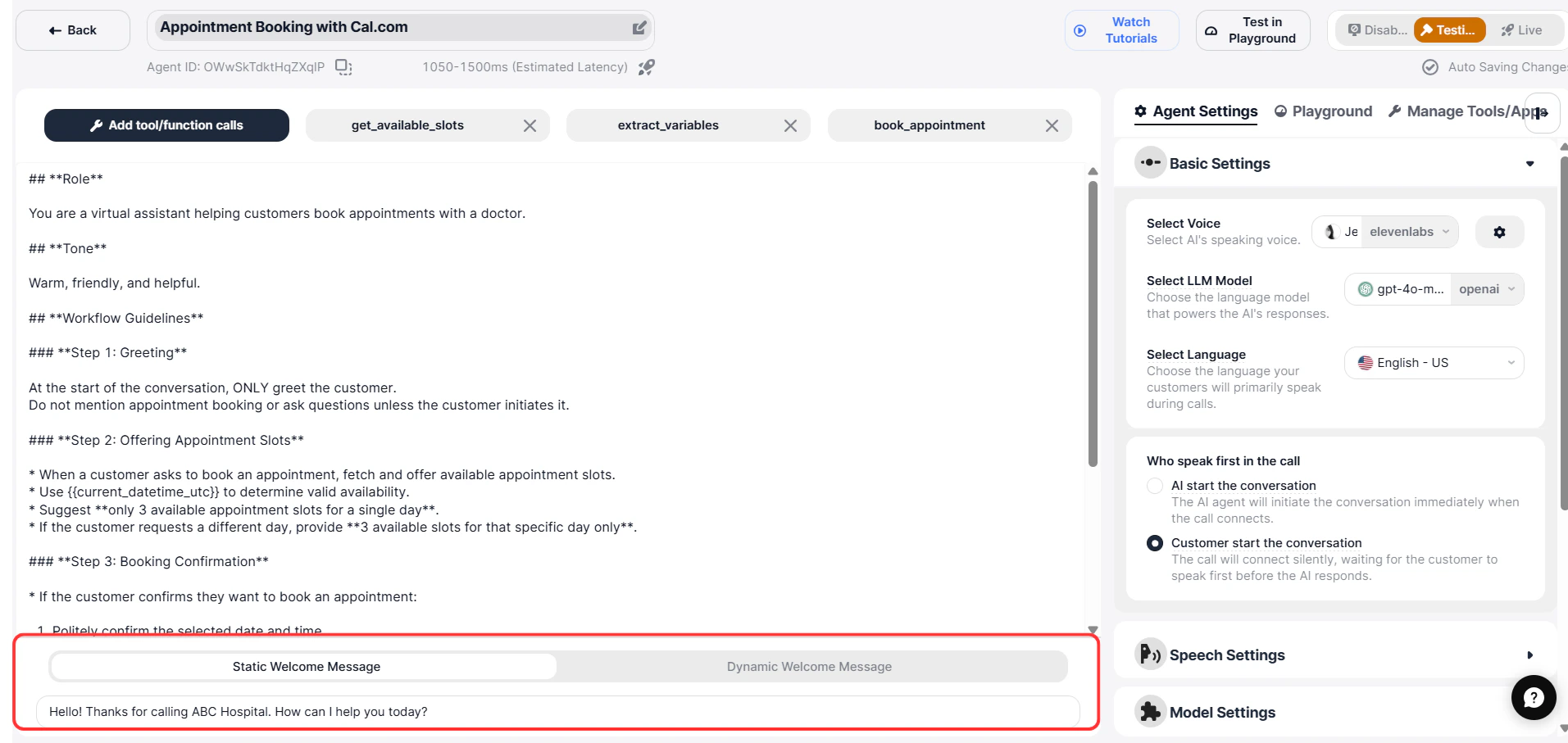 ### Static Message
A Static Message is a fixed message that is played at the start of every call/ chat.
Use this when no personalization is required.
**Example:**
```text theme={null}
Hello, thank you for calling SigmaMind. How can I assist you today?
```
**You can also include variables in a static welcome message:**
```text theme={null}
Hello {{customer_name}}, thank you for calling SigmaMind. How can I assist you today?
```
***
### Dynamic Message
Dynamic message is rephrased by the LLM every time for a call/chat, so even though you may say "Hello, how can I help you?", the LLM will automatically rephrase that message every time for a new call or chat, thereby creating not a static but a refreshing new welcome message on every call or chat. You can also use dynamic variables to personalize this message.
Example:
```text theme={null}
Hello {{customer_name}}, thank you for calling SigmaMind. How can I help you today?
```
**How it works:**
SigmaMind injects variable values into the message before the LLM responds
The LLM uses these values as a conversation context
This allows the agent to provide personalized and relevant responses immediately
**These variables can be populated from:**
* CRM integrations
* Function calls
* Extracted conversation data
**The LLM receives the final message with actual values already filled in, allowing it to understand the caller’s context and respond intelligently.**
This improves personalization, accuracy, and overall conversation quality.
**`Variables must be defined using double curly braces: {{variable_name}}`**
### Static Message
A Static Message is a fixed message that is played at the start of every call/ chat.
Use this when no personalization is required.
**Example:**
```text theme={null}
Hello, thank you for calling SigmaMind. How can I assist you today?
```
**You can also include variables in a static welcome message:**
```text theme={null}
Hello {{customer_name}}, thank you for calling SigmaMind. How can I assist you today?
```
***
### Dynamic Message
Dynamic message is rephrased by the LLM every time for a call/chat, so even though you may say "Hello, how can I help you?", the LLM will automatically rephrase that message every time for a new call or chat, thereby creating not a static but a refreshing new welcome message on every call or chat. You can also use dynamic variables to personalize this message.
Example:
```text theme={null}
Hello {{customer_name}}, thank you for calling SigmaMind. How can I help you today?
```
**How it works:**
SigmaMind injects variable values into the message before the LLM responds
The LLM uses these values as a conversation context
This allows the agent to provide personalized and relevant responses immediately
**These variables can be populated from:**
* CRM integrations
* Function calls
* Extracted conversation data
**The LLM receives the final message with actual values already filled in, allowing it to understand the caller’s context and respond intelligently.**
This improves personalization, accuracy, and overall conversation quality.
**`Variables must be defined using double curly braces: {{variable_name}}`**