> ## Documentation Index
> Fetch the complete documentation index at: https://docs.sigmamind.ai/llms.txt
> Use this file to discover all available pages before exploring further.
# How to configure basic settings
Basic Settings define how your AI agent **sounds, thinks, and communicates** during a call.
These are the **core configuration controls** that directly impact:
* Voice quality and experience
* Response speed and intelligence
* Language understanding and accuracy
* Overall conversation flow
👉 Incorrect setup here can lead to robotic voice, slow responses, or poor user experience.
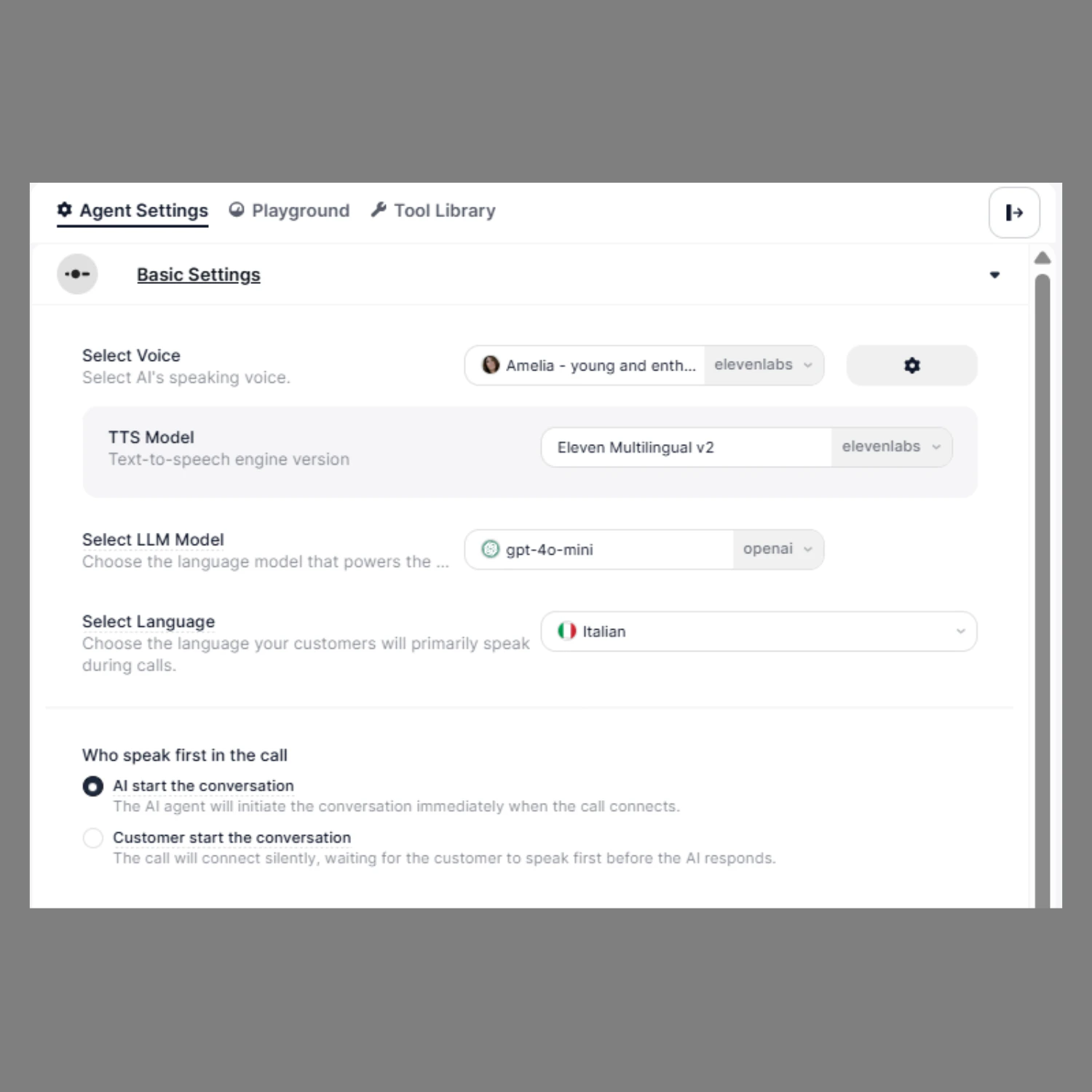 ## What You Configure Here
| Setting | What It Controls | Why It Matters |
| :--------------------------------------------------------------------------------------- | :------------------------ | :---------------------------------------- |
| [**Voice**](/documentation/agents/single-prompt-agent/how-to-select-voice-of-your-agent) | How the agent sounds | Affects user trust and engagement |
| **TTS Model** | Speech generation quality | Impacts realism and latency |
| [**LLM Model**](/documentation/agents/single-prompt-agent/how-to-select-llm-model) | Intelligence of responses | Controls speed, accuracy, and reasoning |
| [**Language**](/documentation/agents/single-prompt-agent/how-to-select-language) | Input/output language | Ensures correct understanding and replies |
| [**Who Speaks First**](/documentation/agents/single-prompt-agent/untitled-page) | Call start behavior | Defines conversation flow |
You can define:
* How your agent speaks (Voice)
* How your agent thinks (LLM Model)
* Which language it understands
* Who starts the conversation
## How to Configure
1. Open your agent in the **Agent Builder**
2. From the right-side panel, click on **Agent Settings**
3. In the **Basic Settings** section, configure Voice, LLM Model, Language, and conversation start preference
All changes are automatically saved. Review your settings before going live.
## What You Configure Here
| Setting | What It Controls | Why It Matters |
| :--------------------------------------------------------------------------------------- | :------------------------ | :---------------------------------------- |
| [**Voice**](/documentation/agents/single-prompt-agent/how-to-select-voice-of-your-agent) | How the agent sounds | Affects user trust and engagement |
| **TTS Model** | Speech generation quality | Impacts realism and latency |
| [**LLM Model**](/documentation/agents/single-prompt-agent/how-to-select-llm-model) | Intelligence of responses | Controls speed, accuracy, and reasoning |
| [**Language**](/documentation/agents/single-prompt-agent/how-to-select-language) | Input/output language | Ensures correct understanding and replies |
| [**Who Speaks First**](/documentation/agents/single-prompt-agent/untitled-page) | Call start behavior | Defines conversation flow |
You can define:
* How your agent speaks (Voice)
* How your agent thinks (LLM Model)
* Which language it understands
* Who starts the conversation
## How to Configure
1. Open your agent in the **Agent Builder**
2. From the right-side panel, click on **Agent Settings**
3. In the **Basic Settings** section, configure Voice, LLM Model, Language, and conversation start preference
All changes are automatically saved. Review your settings before going live.