> ## Documentation Index
> Fetch the complete documentation index at: https://docs.sigmamind.ai/llms.txt
> Use this file to discover all available pages before exploring further.
# Dynamic variables
> Learn how to use dynamic variables in SigmaMind to personalize responses, campaigns, and conversations.
Dynamic Variables enable real-time personalization across every interaction in SigmaMind. Instead of static, hardcoded messages, you define named placeholders in your agent prompts, email templates, and workflow logic. At runtime, those placeholders are resolved with live values sourced from APIs, campaign files, webhooks, headers, or the conversation itself producing responses that feel specific and contextual to each individual customer.
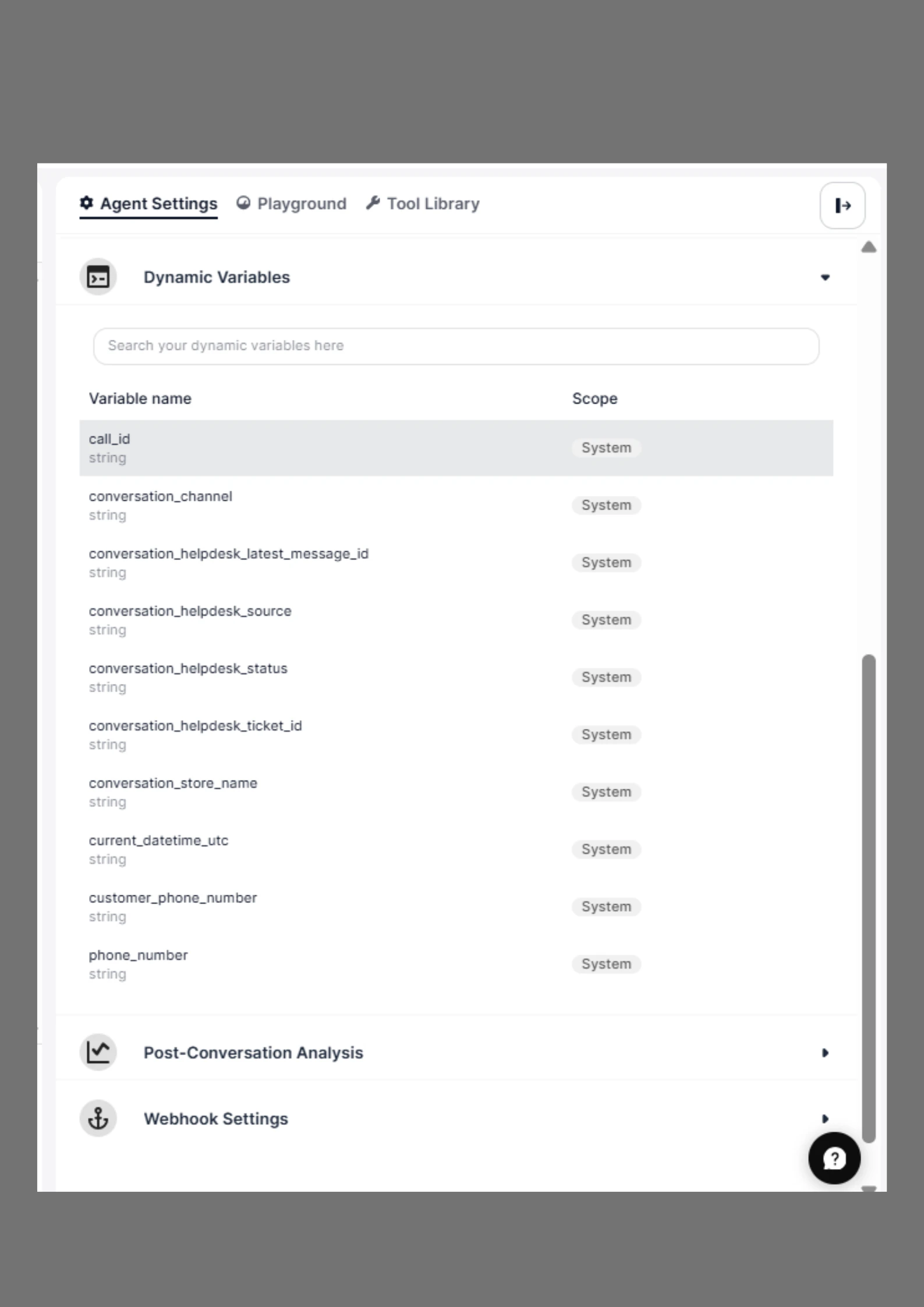 **Dynamic variables use double curly brace syntax throughout the platform:**
```text theme={null}
{{ variable_name }}
```
For example, if you want to include a customer’s name in a message:
```text theme={null}
Hello {{ customer_name }}, thanks for reaching out!
```
**Behavior when a variable is undefined at runtime**
If a variable is referenced in a node but no value has been provided, the platform renders an empty string by default.
## Where Dynamic Variables Are Supported
### Dynamic variables can be used in any nodes inside SigmaMind:
* **Agent Responses** – Personalize replies with customer details.
* **Email Templates** – Insert variables like `{{ customer_email }}` or `{{ order_id }}`.
* **Campaigns** – Pass variables from campaign uploads or APIs to customize conversations.
* **Webhooks and Integrations** – Include context-specific variables in outbound data.
Dynamic variables make your AI agent feel more personal and context-aware without requiring manual customization for each interaction.
## Sources of Dynamic Variables
### Dynamic variables can come from multiple sources:
Variables can be populated from different sources. Use the table below to select the right source for your integration pattern, then refer to the corresponding section for implementation details.
| Source | Trigger | Best for | Real-time? |
| ---------------------------------------- | ------------------------------------------- | --------------------------------------------------------------- | --------------- |
| API | API request containing a variables object | Backend-driven personalization for calls, chats, or workflows | Yes |
| Campaign CSV Upload | Batch campaign creation via CSV or API | Large-scale outreach with pre-defined contact data | No (pre-loaded) |
| Inbound Webhook | Customer initiates an inbound call | Real-time CRM lookup and dynamic routing for inbound calls | Yes |
| Custom Headers | Call creation or transfer with metadata | Passing structured, non-conversational metadata between systems | Yes |
| Conversation Extraction(Extract Varable) | Agent captures data during the conversation | Collecting user-provided data naturally during interaction | Yes (live) |
#### 1. [Create Call API](/api-reference/calls/create-phone-call)
When creating a call via the API, you can pass custom variables in the `variables` object.
```json Example API Create Call with Variables theme={null}
{
"fromPhoneNumber": 14155552671,
"toPhoneNumber": 14155552671,
"agentId": "D5D0p7TUs66TTAEAx",
"variables": {
"customer_name": "Michael"
}
}
```
#### 2. [Campaign Uploads](/api-reference/campaigns/create-campaign)
When uploading a CSV file for a campaign, include columns for any variables you want to use.
```sh Create Campaign with Variables theme={null}
curl --request POST \
--url https://api.sigmamind.ai/v1/campaigns \
--header 'Content-Type: multipart/form-data' \
--header 'X-API-Key: ' \
--form 'campaignName=' \
--form sipPhoneNumber=14155552671 \
--form agentId=D5D0p7TUs66TTAEAx \
--form isScheduled=true \
--form scheduledDate=2023-11-07T05:31:56Z \
--form scheduledTime=12:00:00 \
--form scheduledTimezone=America/Los_Angeles \
--form concurrentCalls=5 \
--form 'variables={
"customer_name": "Michael"
}' \
--form file=@example-file
```
```csv Example Create Campaign uploading CSV with Variables theme={null}
Phone Number,Customer Name,Order ID
+14155552671,Michael,12345
+14155552672,Sarah,67890
```
These values will be injected into your campaign messages automatically in lowercase with underscores.
#### 3. [Inbound Webhooks](documentation/calls/receive-calls) (Receive Calls)
When a user calls your number, you can dynamically inject variables using an **Inbound Webhook**.
### Request Payload
```json theme={null}
{
"event": "inbound_call",
"agent_id": "shvb5xs5fo2D2222",
"from_number": "+12345678912",
"to_number": "+12345678913"
}
```
## **Response**
Your endpoint should return a JSON response with a 2xx status code, containing upto 2 optional fields. The following fields are available:
* `dynamic_variables`: use this to define dynamic variables specific to this inbound call.
* `override_agent_id`: if you want to override the agent id, you can set it here.
Here’s a sample response for inbound call:
```json theme={null}
{
"dynamic_variables": {
"first_name": "Jim",
"last_name": "Smith"
},
"override_agent_id":"shvb5xs5fo2D2225"
}
```
### **End-to-end flow**
1. Customer dials your SigmaMind number.
2. SigmaMind sends the inbound\_call payload to your webhook URL.
3. Your system performs a CRM or database lookup using from\_number.
4. Your system returns dynamic\_variables
5. SigmaMind connects the agent with all returned variables pre-loaded.
6. The agent begins the conversation with full customer context already available.
### Use when:
* Handling inbound calls
* Fetching real-time customer data
* Routing calls dynamically
#### 4. [Custom Headers](/documentation/agents/add-advance-nodes/howto-use-sip-custom-header)
Custom Headers allow you to send structured metadata along with a call or call transfer.
They are:
* Not visible to the customer
* Available to backend systems, CRMs, and receiving agents
Learn more about Custom Headers [here](/documentation/agents/add-advance-nodes/howto-use-sip-custom-header)
#### 5. Conversation Extracted Variables
Some variables are automatically captured from the conversation itself. For example:
* If the agent asks for the customer’s email, it can be extracted and stored as `{{ customer_email }}`.
* If the agent identifies an order number, it can be stored as `{{ order_id }}`.
Conversation variables are context-aware and evolve as the interaction progresses.
### Example Usage
* In an Agent Response
```text theme={null}
Hi {{ customer_name }}, your order {{ order_id }} is confirmed and will be delivered by {{ delivery_date }}.
```
* In an Email Template
```text theme={null}
Subject: Order Confirmation for {{ customer_name }}
Dear {{ customer_name }},
Thank you for your purchase! Your order ID is {{ order_id }}.
We will notify you at {{ customerEmail }} once your order ships.
Best regards,
Team SigmaMind
```
Lifecycle of a Dynamic Variable
**Step 1: Define**
```text theme={null}
Hi {{ customer_name }}
```
**Step 2: Populate (Runtime)**
Value comes from:
* API
* Campaign (CSV)
* Webhook
* Custom Headers
* Conversation
**Step 3: Use**
**Used in:**
* Agent responses
* Tool execution
* Workflow logic
**Step 4: Observe**
You can view variable values in:
* Conversation logs
* Node logs
* System logs
* Post-conversation analysis
* Webhook outputs
## View Dynamic Variables at Runtime (Dashboard)
You can view how dynamic variables are populated during a call directly from the dashboard.
**Dynamic variables use double curly brace syntax throughout the platform:**
```text theme={null}
{{ variable_name }}
```
For example, if you want to include a customer’s name in a message:
```text theme={null}
Hello {{ customer_name }}, thanks for reaching out!
```
**Behavior when a variable is undefined at runtime**
If a variable is referenced in a node but no value has been provided, the platform renders an empty string by default.
## Where Dynamic Variables Are Supported
### Dynamic variables can be used in any nodes inside SigmaMind:
* **Agent Responses** – Personalize replies with customer details.
* **Email Templates** – Insert variables like `{{ customer_email }}` or `{{ order_id }}`.
* **Campaigns** – Pass variables from campaign uploads or APIs to customize conversations.
* **Webhooks and Integrations** – Include context-specific variables in outbound data.
Dynamic variables make your AI agent feel more personal and context-aware without requiring manual customization for each interaction.
## Sources of Dynamic Variables
### Dynamic variables can come from multiple sources:
Variables can be populated from different sources. Use the table below to select the right source for your integration pattern, then refer to the corresponding section for implementation details.
| Source | Trigger | Best for | Real-time? |
| ---------------------------------------- | ------------------------------------------- | --------------------------------------------------------------- | --------------- |
| API | API request containing a variables object | Backend-driven personalization for calls, chats, or workflows | Yes |
| Campaign CSV Upload | Batch campaign creation via CSV or API | Large-scale outreach with pre-defined contact data | No (pre-loaded) |
| Inbound Webhook | Customer initiates an inbound call | Real-time CRM lookup and dynamic routing for inbound calls | Yes |
| Custom Headers | Call creation or transfer with metadata | Passing structured, non-conversational metadata between systems | Yes |
| Conversation Extraction(Extract Varable) | Agent captures data during the conversation | Collecting user-provided data naturally during interaction | Yes (live) |
#### 1. [Create Call API](/api-reference/calls/create-phone-call)
When creating a call via the API, you can pass custom variables in the `variables` object.
```json Example API Create Call with Variables theme={null}
{
"fromPhoneNumber": 14155552671,
"toPhoneNumber": 14155552671,
"agentId": "D5D0p7TUs66TTAEAx",
"variables": {
"customer_name": "Michael"
}
}
```
#### 2. [Campaign Uploads](/api-reference/campaigns/create-campaign)
When uploading a CSV file for a campaign, include columns for any variables you want to use.
```sh Create Campaign with Variables theme={null}
curl --request POST \
--url https://api.sigmamind.ai/v1/campaigns \
--header 'Content-Type: multipart/form-data' \
--header 'X-API-Key: ' \
--form 'campaignName=' \
--form sipPhoneNumber=14155552671 \
--form agentId=D5D0p7TUs66TTAEAx \
--form isScheduled=true \
--form scheduledDate=2023-11-07T05:31:56Z \
--form scheduledTime=12:00:00 \
--form scheduledTimezone=America/Los_Angeles \
--form concurrentCalls=5 \
--form 'variables={
"customer_name": "Michael"
}' \
--form file=@example-file
```
```csv Example Create Campaign uploading CSV with Variables theme={null}
Phone Number,Customer Name,Order ID
+14155552671,Michael,12345
+14155552672,Sarah,67890
```
These values will be injected into your campaign messages automatically in lowercase with underscores.
#### 3. [Inbound Webhooks](documentation/calls/receive-calls) (Receive Calls)
When a user calls your number, you can dynamically inject variables using an **Inbound Webhook**.
### Request Payload
```json theme={null}
{
"event": "inbound_call",
"agent_id": "shvb5xs5fo2D2222",
"from_number": "+12345678912",
"to_number": "+12345678913"
}
```
## **Response**
Your endpoint should return a JSON response with a 2xx status code, containing upto 2 optional fields. The following fields are available:
* `dynamic_variables`: use this to define dynamic variables specific to this inbound call.
* `override_agent_id`: if you want to override the agent id, you can set it here.
Here’s a sample response for inbound call:
```json theme={null}
{
"dynamic_variables": {
"first_name": "Jim",
"last_name": "Smith"
},
"override_agent_id":"shvb5xs5fo2D2225"
}
```
### **End-to-end flow**
1. Customer dials your SigmaMind number.
2. SigmaMind sends the inbound\_call payload to your webhook URL.
3. Your system performs a CRM or database lookup using from\_number.
4. Your system returns dynamic\_variables
5. SigmaMind connects the agent with all returned variables pre-loaded.
6. The agent begins the conversation with full customer context already available.
### Use when:
* Handling inbound calls
* Fetching real-time customer data
* Routing calls dynamically
#### 4. [Custom Headers](/documentation/agents/add-advance-nodes/howto-use-sip-custom-header)
Custom Headers allow you to send structured metadata along with a call or call transfer.
They are:
* Not visible to the customer
* Available to backend systems, CRMs, and receiving agents
Learn more about Custom Headers [here](/documentation/agents/add-advance-nodes/howto-use-sip-custom-header)
#### 5. Conversation Extracted Variables
Some variables are automatically captured from the conversation itself. For example:
* If the agent asks for the customer’s email, it can be extracted and stored as `{{ customer_email }}`.
* If the agent identifies an order number, it can be stored as `{{ order_id }}`.
Conversation variables are context-aware and evolve as the interaction progresses.
### Example Usage
* In an Agent Response
```text theme={null}
Hi {{ customer_name }}, your order {{ order_id }} is confirmed and will be delivered by {{ delivery_date }}.
```
* In an Email Template
```text theme={null}
Subject: Order Confirmation for {{ customer_name }}
Dear {{ customer_name }},
Thank you for your purchase! Your order ID is {{ order_id }}.
We will notify you at {{ customerEmail }} once your order ships.
Best regards,
Team SigmaMind
```
Lifecycle of a Dynamic Variable
**Step 1: Define**
```text theme={null}
Hi {{ customer_name }}
```
**Step 2: Populate (Runtime)**
Value comes from:
* API
* Campaign (CSV)
* Webhook
* Custom Headers
* Conversation
**Step 3: Use**
**Used in:**
* Agent responses
* Tool execution
* Workflow logic
**Step 4: Observe**
You can view variable values in:
* Conversation logs
* Node logs
* System logs
* Post-conversation analysis
* Webhook outputs
## View Dynamic Variables at Runtime (Dashboard)
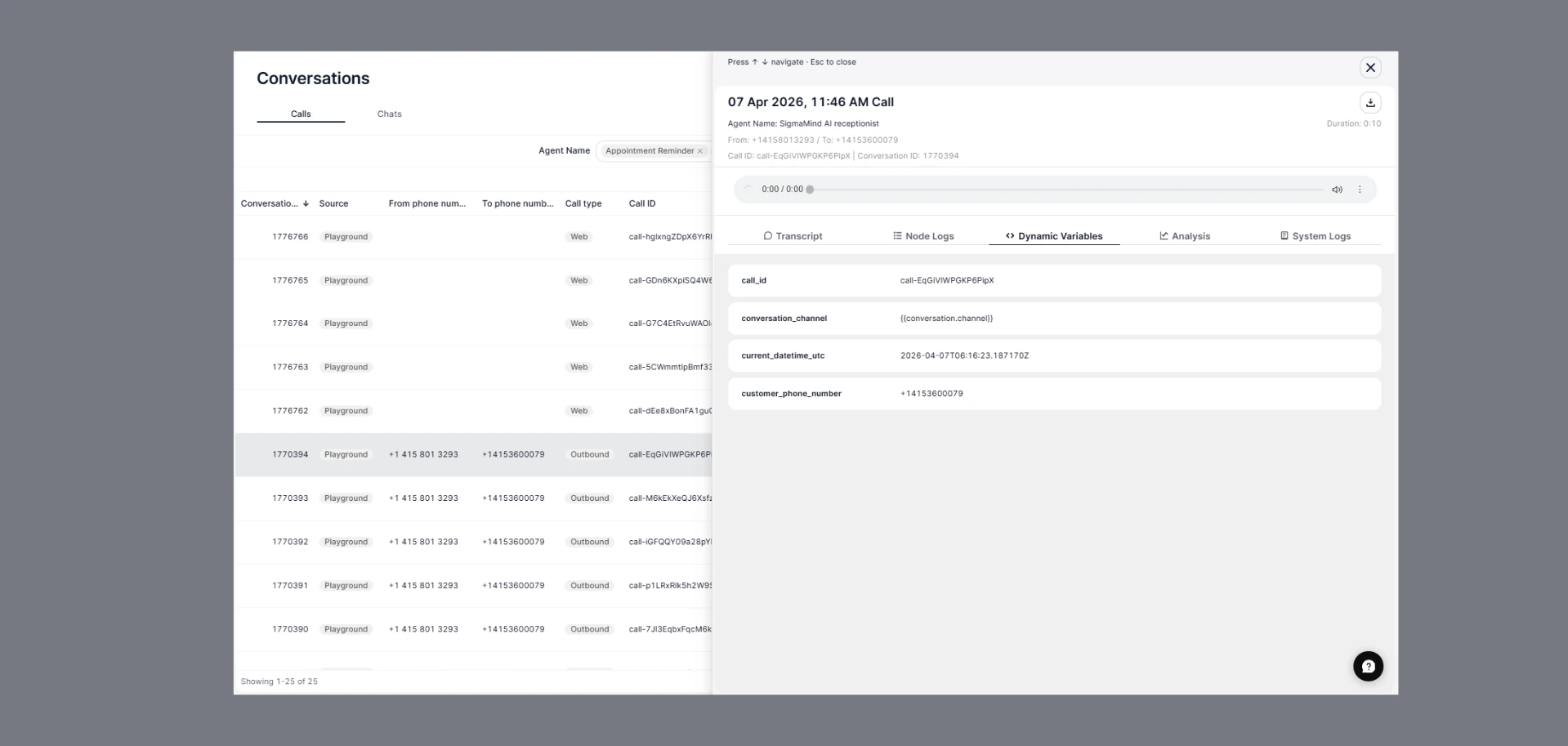
You can view how dynamic variables are populated during a call directly from the dashboard.
 ### Steps
1. Go to **Conversations** from the left sidebar
2. Click on any call or chat
3. Open the **Dynamic Variables** tab
### What You’ll See
* All variables available during that conversation
* Runtime values (from API, webhook, headers, or extraction)
Example:
```text theme={null}
customer_name → Michael
order_id → 12345
last_order_date → 2026-04-20
```
***
## Why This Is Important
Use this view to:
* Debug missing or incorrect variables\\
* Verify data passed from API / webhook / CSV\\
* Understand how variables change during runtime\\
***
You can also see:
* **Transcript** → See where variables are used in conversation\\
* **Node Logs** → Debug step-by-step execution\\
* **System Logs** → Check backend events\\
* **Analysis** → View post-conversation insights
***
### Best Practices
* Always provide default values to handle missing or undefined variables.
* Keep variable names simple, consistent, and descriptive (e.g., customer\_name, order\_id).
* Validate and sanitize inputs from external sources such as API, CSV uploads, webhooks, and headers.
* Use the right source for the right use case (API for real-time data, CSV for campaigns, webhook for inbound calls, headers for metadata).
* Prefer conversation-extracted variables to reduce manual data collection during interactions.
* Avoid overloading variables with complex or nested data—keep values clean and usable.
* Test variable population during simulation to ensure values are correctly passed at runtime.
#### Summary:
* Dynamic Variables use the `{{ variable_name }}` format and allow you to inject real-time data into your agent.
* They are populated at runtime from sources like API calls, CSV campaigns, inbound webhooks, custom headers, and conversation inputs.
* They can be used across all agent nodes to enable personalized, context-aware, and fully automated interactions.
***
Dynamic variables empower your AI agent to adapt responses to each customer’s context, making conversations more natural and engaging.
### Steps
1. Go to **Conversations** from the left sidebar
2. Click on any call or chat
3. Open the **Dynamic Variables** tab
### What You’ll See
* All variables available during that conversation
* Runtime values (from API, webhook, headers, or extraction)
Example:
```text theme={null}
customer_name → Michael
order_id → 12345
last_order_date → 2026-04-20
```
***
## Why This Is Important
Use this view to:
* Debug missing or incorrect variables\\
* Verify data passed from API / webhook / CSV\\
* Understand how variables change during runtime\\
***
You can also see:
* **Transcript** → See where variables are used in conversation\\
* **Node Logs** → Debug step-by-step execution\\
* **System Logs** → Check backend events\\
* **Analysis** → View post-conversation insights
***
### Best Practices
* Always provide default values to handle missing or undefined variables.
* Keep variable names simple, consistent, and descriptive (e.g., customer\_name, order\_id).
* Validate and sanitize inputs from external sources such as API, CSV uploads, webhooks, and headers.
* Use the right source for the right use case (API for real-time data, CSV for campaigns, webhook for inbound calls, headers for metadata).
* Prefer conversation-extracted variables to reduce manual data collection during interactions.
* Avoid overloading variables with complex or nested data—keep values clean and usable.
* Test variable population during simulation to ensure values are correctly passed at runtime.
#### Summary:
* Dynamic Variables use the `{{ variable_name }}` format and allow you to inject real-time data into your agent.
* They are populated at runtime from sources like API calls, CSV campaigns, inbound webhooks, custom headers, and conversation inputs.
* They can be used across all agent nodes to enable personalized, context-aware, and fully automated interactions.
***
Dynamic variables empower your AI agent to adapt responses to each customer’s context, making conversations more natural and engaging.