> ## Documentation Index
> Fetch the complete documentation index at: https://docs.sigmamind.ai/llms.txt
> Use this file to discover all available pages before exploring further.
# Conversational Flow Agent
> Learn how to build custom conversational AI agents using SigmaMind's AI agent builder.
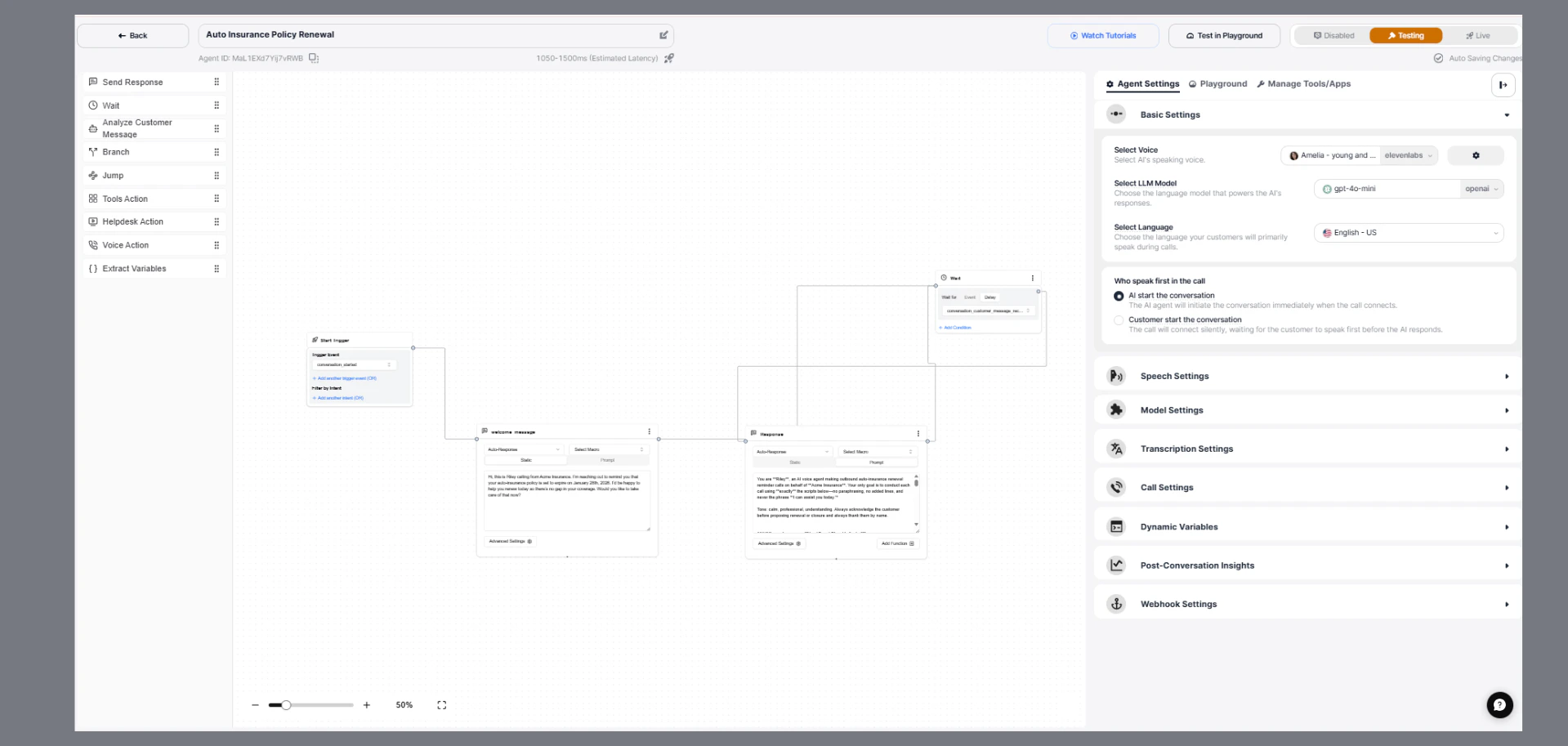
SigmaMind AI enables developers to build intelligent conversational agents using a visual, node-based workflow builder.
Each agent is designed by connecting modular components (nodes) that define how a conversation starts, progresses, makes decisions, and interacts with external systems.
This approach allows you to create:
* Multi-step conversations
* Automated workflows
* Context-aware responses
* Cross-channel support
 ***
## **How Conversational Flows Work**
A conversational flow follows a structured sequence:
* A conversation begins
* The AI agent is triggered
* The agent responds or asks for input
* The user replies
* The system analyzes the message
* Actions or decisions are executed
* The conversation continues until completion
Each of these steps is powered by specific nodes in the builder.
***
## **1. Start Trigger (Entry Point)**
The **Start Trigger** defines when an AI agent workflow begins. It acts as the entry point of every conversational flow.
When a new agent is created:
* The Start Trigger node is automatically added
* It cannot be removed or replaced
* All other nodes connect after it
### **Trigger Event**
**Conversation Started (Default Event)**
SigmaMind currently supports one trigger event:
* **Conversation Started**
This event activates the AI agent whenever a new conversation begins across any supported channel.
### **Supported Scenarios**
* Chat initiated via helpdesk
* Incoming support email
* Slack or WhatsApp conversation
* Inbound phone call
* Outbound system call (e.g., callback)
### **Configuration Options**
**Multiple Conditions**
* Add multiple conditions using OR logic
* The flow starts if any condition is satisfied
**Filter by Intent (Optional)**
* Restrict agent activation based on user intent
* Uses pre-trained intents from SigmaMind AI
* Requires high confidence (>95%)
Best suited for: chat and email\
Not recommended for: voice-first interactions
### **Important Note**
For voice conversations, intent is typically detected later in the flow using the **Analyze Customer Message** node.
***
## **2. Core Nodes in Conversational Flow**
After the Start Trigger, different nodes are used to design the conversation.
### **Send Response**
The **Send Response** node is used to communicate with users.
It supports:
* Dynamic prompts
* Predefined templates (macros)
* Channel-specific messaging
👉 Used for greetings, confirmations, and replies.
(See [Send Response](/documentation/agents/add-basic-nodes/response-node) documentation for detailed configuration.)
***
### **Analyze Customer Message**
The **Analyze Customer Message** node helps the AI understand what the user is saying and route the conversation accordingly.
It evaluates the customer’s message against defined conditions and directs the flow based on the best match. If no match is found, the conversation follows the Else path.
👉 Used to detect user intent and enable multi-path conversations.
(See [Analyze Customer Message](/documentation/agents/add-basic-nodes/customer-intent-node) documentation for details.)
***
### **Wait**
The **Wait** node pauses the flow until a specific event occurs.
It allows:
* Waiting for user replies
* Adding time delays
* Controlling conversational timing
👉 Essential for enabling back-and-forth conversations.
(See [Wait](/documentation/agents/add-basic-nodes/wait-node) documentation for details.)
***
### **Tool Actions**
The **Tool Actions** node connects the agent to external systems via APIs.
It enables:
* Data retrieval (e.g., order details)
* Performing actions (e.g., updating records)
👉 Used for real-time integrations with CRMs, Shopify, etc.
(See [Tool Action](/documentation/agents/add-advance-nodes/app-action-node) documentation for setup and usage.)
***
### **Branch**
The **Branch** node introduces decision-making into the flow.
It supports:
* Conditional logic (AND/OR)
* Data-based routing (e.g., API responses)
👉 Used to create dynamic and personalized conversation paths.
(See [Branch](/documentation/agents/add-basic-nodes/branch-node) documentation for advanced conditions.)
***
## **3. Designing Conversational Flows**
A complete conversational flow is created by connecting nodes in a logical sequence.
### **Typical Flow Structure**
* Start Trigger
* Send Response (Greeting)
* Wait (User Input)
* Analyze Customer Message
* Tool Actions (Fetch Data / Perform Action)
* Branch (Decision Making)
* Send Response
* Loop back to Wait
This structure enables dynamic and interactive conversations.
***
## **4. Example Use Case: Order Cancellation**
### **Flow Overview**
* Conversation starts
* User requests order cancellation
* Message is analyzed
* Order details are retrieved via App Actions
* Eligibility is checked using Branch
* AI offers a retention discount
* Waits for user response
* Continues based on user decision
***
## **5. Looping Mechanism**
Looping is a key concept in conversational design.
After responding, the flow can reconnect to the **Wait** node, allowing:
* Continuous interaction
* Multi-turn conversations
* Decision-based progression
***
## **6. Testing in Playground**
SigmaMind provides a Playground to test conversational flows.
### **What to Validate**
* Trigger activation
* Node execution flow
* Message analysis accuracy
* API responses
* Final output See [Test Your Agent](/documentation/playground/overview) documentation for detailed info.
***
## **7. Best Practices**
* Keep flows simple and modular
* Use clear and specific conditions in Analyze Customer Message
* Add fallback (Else) responses
* Use branching for personalization
* Always include Wait nodes for interaction
* Test multiple scenarios before deployment
***
## **Conclusion**
SigmaMind’s Conversational Flow Builder allows you to design scalable, intelligent AI agents by combining:
* A fixed entry point (Start Trigger)
* Modular conversation nodes
* Message-based routing (Analyze Customer Message)
* API integrations (Tool Actions)
* Conditional logic (Branch)
* Continuous interaction (Wait + looping)
By structuring flows effectively, you can deliver seamless, automated, and human-like conversational experiences across multiple channels.
***
***
## **How Conversational Flows Work**
A conversational flow follows a structured sequence:
* A conversation begins
* The AI agent is triggered
* The agent responds or asks for input
* The user replies
* The system analyzes the message
* Actions or decisions are executed
* The conversation continues until completion
Each of these steps is powered by specific nodes in the builder.
***
## **1. Start Trigger (Entry Point)**
The **Start Trigger** defines when an AI agent workflow begins. It acts as the entry point of every conversational flow.
When a new agent is created:
* The Start Trigger node is automatically added
* It cannot be removed or replaced
* All other nodes connect after it
### **Trigger Event**
**Conversation Started (Default Event)**
SigmaMind currently supports one trigger event:
* **Conversation Started**
This event activates the AI agent whenever a new conversation begins across any supported channel.
### **Supported Scenarios**
* Chat initiated via helpdesk
* Incoming support email
* Slack or WhatsApp conversation
* Inbound phone call
* Outbound system call (e.g., callback)
### **Configuration Options**
**Multiple Conditions**
* Add multiple conditions using OR logic
* The flow starts if any condition is satisfied
**Filter by Intent (Optional)**
* Restrict agent activation based on user intent
* Uses pre-trained intents from SigmaMind AI
* Requires high confidence (>95%)
Best suited for: chat and email\
Not recommended for: voice-first interactions
### **Important Note**
For voice conversations, intent is typically detected later in the flow using the **Analyze Customer Message** node.
***
## **2. Core Nodes in Conversational Flow**
After the Start Trigger, different nodes are used to design the conversation.
### **Send Response**
The **Send Response** node is used to communicate with users.
It supports:
* Dynamic prompts
* Predefined templates (macros)
* Channel-specific messaging
👉 Used for greetings, confirmations, and replies.
(See [Send Response](/documentation/agents/add-basic-nodes/response-node) documentation for detailed configuration.)
***
### **Analyze Customer Message**
The **Analyze Customer Message** node helps the AI understand what the user is saying and route the conversation accordingly.
It evaluates the customer’s message against defined conditions and directs the flow based on the best match. If no match is found, the conversation follows the Else path.
👉 Used to detect user intent and enable multi-path conversations.
(See [Analyze Customer Message](/documentation/agents/add-basic-nodes/customer-intent-node) documentation for details.)
***
### **Wait**
The **Wait** node pauses the flow until a specific event occurs.
It allows:
* Waiting for user replies
* Adding time delays
* Controlling conversational timing
👉 Essential for enabling back-and-forth conversations.
(See [Wait](/documentation/agents/add-basic-nodes/wait-node) documentation for details.)
***
### **Tool Actions**
The **Tool Actions** node connects the agent to external systems via APIs.
It enables:
* Data retrieval (e.g., order details)
* Performing actions (e.g., updating records)
👉 Used for real-time integrations with CRMs, Shopify, etc.
(See [Tool Action](/documentation/agents/add-advance-nodes/app-action-node) documentation for setup and usage.)
***
### **Branch**
The **Branch** node introduces decision-making into the flow.
It supports:
* Conditional logic (AND/OR)
* Data-based routing (e.g., API responses)
👉 Used to create dynamic and personalized conversation paths.
(See [Branch](/documentation/agents/add-basic-nodes/branch-node) documentation for advanced conditions.)
***
## **3. Designing Conversational Flows**
A complete conversational flow is created by connecting nodes in a logical sequence.
### **Typical Flow Structure**
* Start Trigger
* Send Response (Greeting)
* Wait (User Input)
* Analyze Customer Message
* Tool Actions (Fetch Data / Perform Action)
* Branch (Decision Making)
* Send Response
* Loop back to Wait
This structure enables dynamic and interactive conversations.
***
## **4. Example Use Case: Order Cancellation**
### **Flow Overview**
* Conversation starts
* User requests order cancellation
* Message is analyzed
* Order details are retrieved via App Actions
* Eligibility is checked using Branch
* AI offers a retention discount
* Waits for user response
* Continues based on user decision
***
## **5. Looping Mechanism**
Looping is a key concept in conversational design.
After responding, the flow can reconnect to the **Wait** node, allowing:
* Continuous interaction
* Multi-turn conversations
* Decision-based progression
***
## **6. Testing in Playground**
SigmaMind provides a Playground to test conversational flows.
### **What to Validate**
* Trigger activation
* Node execution flow
* Message analysis accuracy
* API responses
* Final output See [Test Your Agent](/documentation/playground/overview) documentation for detailed info.
***
## **7. Best Practices**
* Keep flows simple and modular
* Use clear and specific conditions in Analyze Customer Message
* Add fallback (Else) responses
* Use branching for personalization
* Always include Wait nodes for interaction
* Test multiple scenarios before deployment
***
## **Conclusion**
SigmaMind’s Conversational Flow Builder allows you to design scalable, intelligent AI agents by combining:
* A fixed entry point (Start Trigger)
* Modular conversation nodes
* Message-based routing (Analyze Customer Message)
* API integrations (Tool Actions)
* Conditional logic (Branch)
* Continuous interaction (Wait + looping)
By structuring flows effectively, you can deliver seamless, automated, and human-like conversational experiences across multiple channels.
***