> ## Documentation Index
> Fetch the complete documentation index at: https://docs.sigmamind.ai/llms.txt
> Use this file to discover all available pages before exploring further.
# Analyze Customer Message
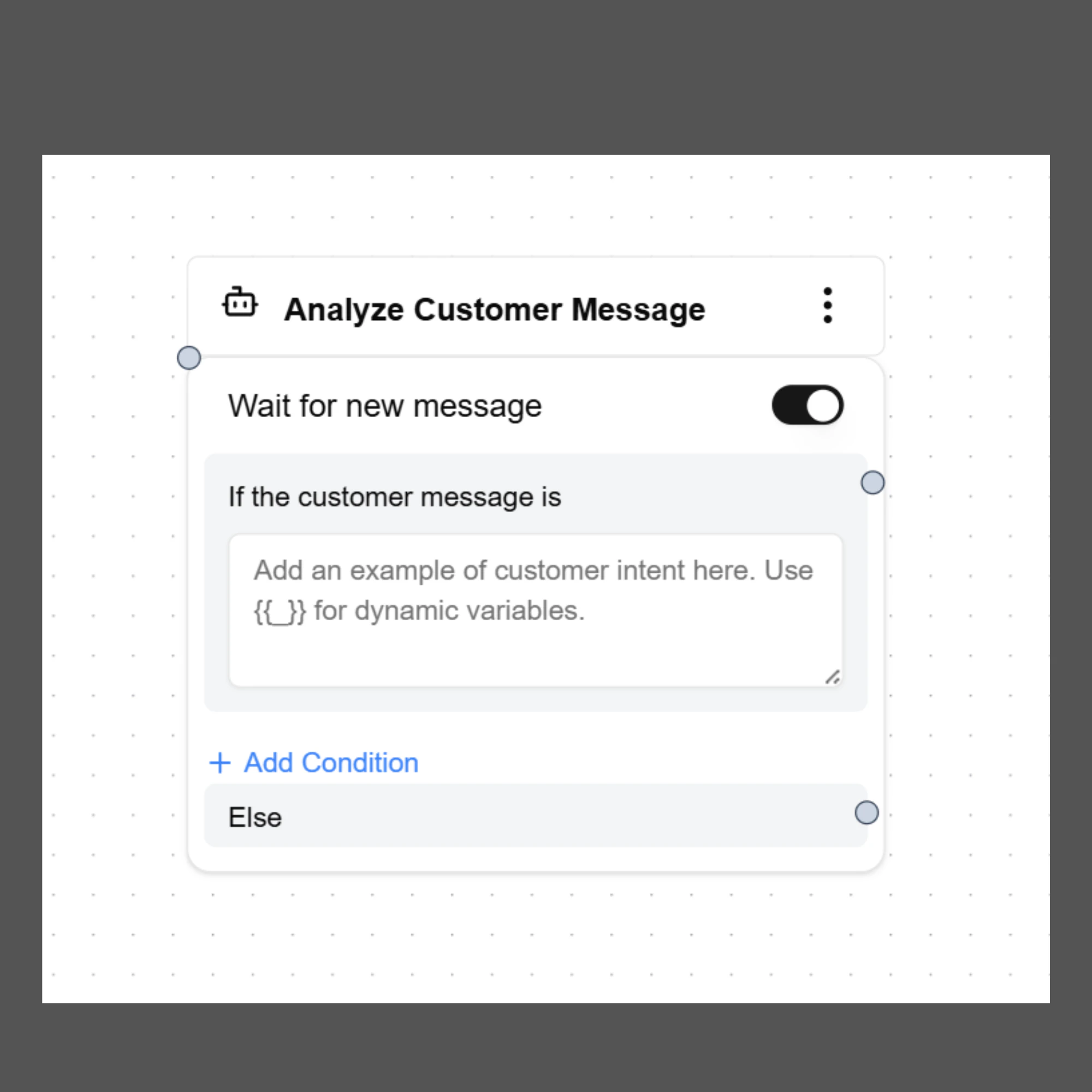
The **Analyze Customer Message Node** allows the AI agent to evaluate the customer’s message and determine what the user is asking for. Based on the detected intent or message content, the agent can route the conversation to different paths in the workflow.
This node is commonly used when the conversation needs to **branch into multiple outcomes depending on what the customer says**.
For example, a customer may want to cancel an order, request support, or ask for more information. The Analyze Customer Message Node helps the agent understand the request and move the conversation to the correct response or action.
 ***
# How It Works
When the **Analyze Customer Message Node** runs, the agent analyzes the customer's message and checks whether it matches any configured conditions.
If a condition matches, the conversation follows the corresponding path connected to that condition. If none of the conditions match, the flow continues through the **Else** path.
This allows developers to design flexible workflows that respond dynamically to customer messages.
***
# Wait for New Message
The **Wait for new message** toggle determines whether the agent should wait for the customer's next response before analyzing the message.
**Enabled**
The agent pauses and waits for the user to send a message. Once the message is received, the node analyzes it and routes the conversation accordingly.
**Disabled**
The node immediately analyzes the latest available customer message in the conversation.
This option is commonly used when the agent has just asked a question and needs to evaluate the customer's reply.
***
# Defining Message Conditions
Inside the **If the customer message is** field, you can define conditions that represent the possible intents or message types you want the agent to detect.
Each condition represents a possible interpretation of the customer's response.
Example conditions:
Customer wants to cancel the order\
Customer accepts the offered discount\
Customer declines the discount\
Customer requests to speak with a human agent
The agent will compare the customer's message against these conditions and follow the corresponding branch when a match is detected.
***
# Adding Multiple Conditions
You can configure multiple message conditions by clicking **Add Condition**.
Each condition creates a separate branch in the conversation flow.
Example workflow:
Condition 1\
Customer wants to cancel the order
Condition 2\
Customer accepts the discount offer
Condition 3\
Customer declines the discount and still wants cancellation
Each condition can connect to a different **Send Response node, Tool Action, or another workflow node**.
***
# Else Path
The **Else** path is used when the customer's message does not match any of the configured conditions.
This ensures the conversation continues smoothly even when the agent cannot clearly detect the expected intent.
Common uses for the Else path include:
Asking the user to clarify their request\
Repeating the previous question\
Providing additional guidance
Example response:
"Sorry, I didn’t quite understand that. Could you please confirm if you would like to cancel the order or continue with it?"
***
# Example Use Case
A customer wants to cancel their order.
1. The agent asks why the customer wants to cancel.
2. The **Analyze Customer Message Node** evaluates the customer's reply.
Possible outcomes:
If the customer insists on cancellation\
→ Proceed with the order cancellation flow.
If the customer is unsure\
→ Offer a retention discount.
If the customer accepts the discount\
→ Confirm the discount and keep the order active.
If the customer declines the discount\
→ Continue with cancellation.
This allows the agent to handle customer conversations more intelligently instead of following a rigid script.
***
# Best Practices
Define clear and distinct conditions so the AI can accurately interpret customer responses.
Use simple and direct descriptions when defining message conditions.
Always configure an **Else path** to handle unexpected responses.
Test different customer responses in the **Playground** to ensure the correct paths are triggered.
***
# How It Works
When the **Analyze Customer Message Node** runs, the agent analyzes the customer's message and checks whether it matches any configured conditions.
If a condition matches, the conversation follows the corresponding path connected to that condition. If none of the conditions match, the flow continues through the **Else** path.
This allows developers to design flexible workflows that respond dynamically to customer messages.
***
# Wait for New Message
The **Wait for new message** toggle determines whether the agent should wait for the customer's next response before analyzing the message.
**Enabled**
The agent pauses and waits for the user to send a message. Once the message is received, the node analyzes it and routes the conversation accordingly.
**Disabled**
The node immediately analyzes the latest available customer message in the conversation.
This option is commonly used when the agent has just asked a question and needs to evaluate the customer's reply.
***
# Defining Message Conditions
Inside the **If the customer message is** field, you can define conditions that represent the possible intents or message types you want the agent to detect.
Each condition represents a possible interpretation of the customer's response.
Example conditions:
Customer wants to cancel the order\
Customer accepts the offered discount\
Customer declines the discount\
Customer requests to speak with a human agent
The agent will compare the customer's message against these conditions and follow the corresponding branch when a match is detected.
***
# Adding Multiple Conditions
You can configure multiple message conditions by clicking **Add Condition**.
Each condition creates a separate branch in the conversation flow.
Example workflow:
Condition 1\
Customer wants to cancel the order
Condition 2\
Customer accepts the discount offer
Condition 3\
Customer declines the discount and still wants cancellation
Each condition can connect to a different **Send Response node, Tool Action, or another workflow node**.
***
# Else Path
The **Else** path is used when the customer's message does not match any of the configured conditions.
This ensures the conversation continues smoothly even when the agent cannot clearly detect the expected intent.
Common uses for the Else path include:
Asking the user to clarify their request\
Repeating the previous question\
Providing additional guidance
Example response:
"Sorry, I didn’t quite understand that. Could you please confirm if you would like to cancel the order or continue with it?"
***
# Example Use Case
A customer wants to cancel their order.
1. The agent asks why the customer wants to cancel.
2. The **Analyze Customer Message Node** evaluates the customer's reply.
Possible outcomes:
If the customer insists on cancellation\
→ Proceed with the order cancellation flow.
If the customer is unsure\
→ Offer a retention discount.
If the customer accepts the discount\
→ Confirm the discount and keep the order active.
If the customer declines the discount\
→ Continue with cancellation.
This allows the agent to handle customer conversations more intelligently instead of following a rigid script.
***
# Best Practices
Define clear and distinct conditions so the AI can accurately interpret customer responses.
Use simple and direct descriptions when defining message conditions.
Always configure an **Else path** to handle unexpected responses.
Test different customer responses in the **Playground** to ensure the correct paths are triggered.