> ## Documentation Index
> Fetch the complete documentation index at: https://docs.sigmamind.ai/llms.txt
> Use this file to discover all available pages before exploring further.
# Billing Logs
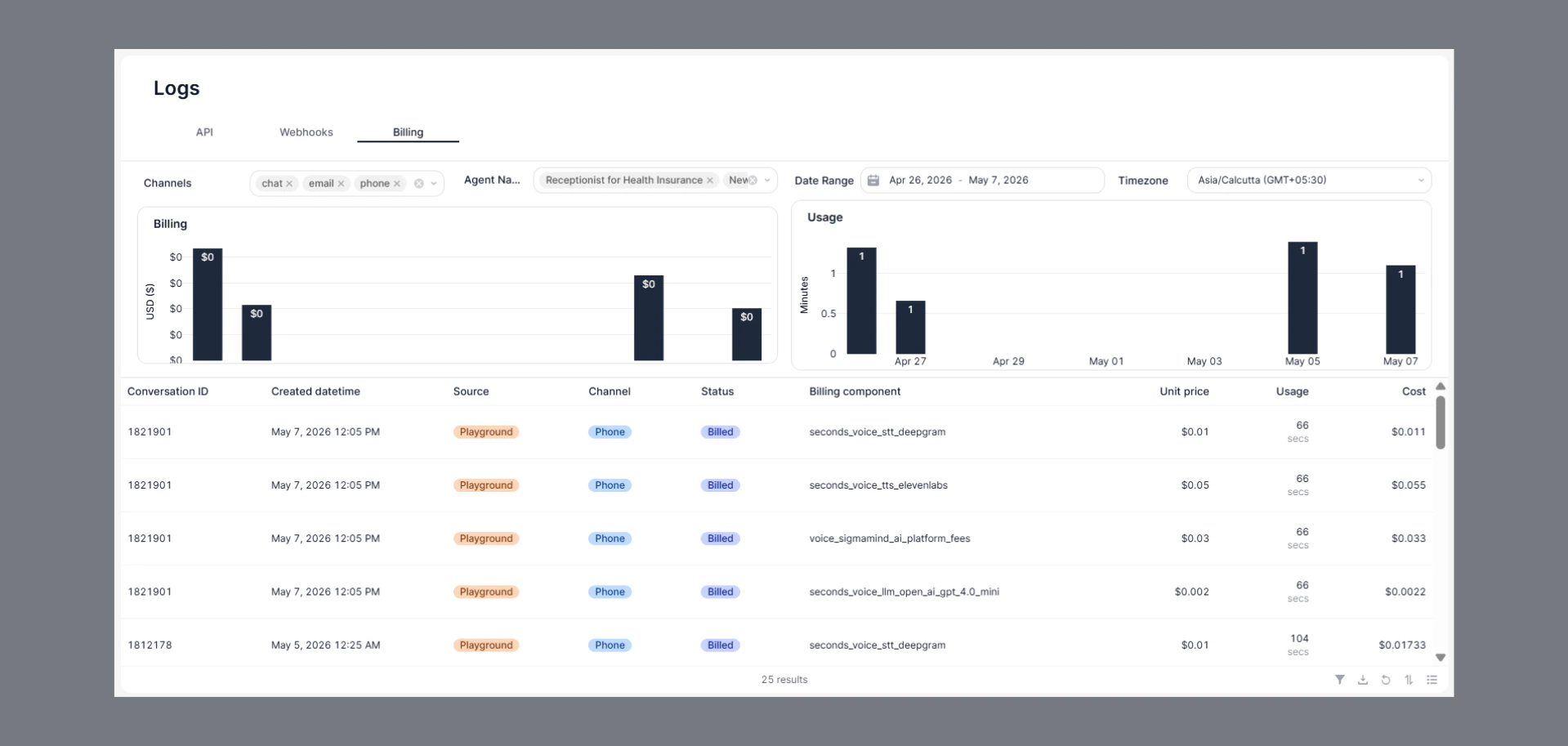
The Billing Logs page provides a breakdown of platform usage and associated billing details across different channels and agents.
 ## How to Navigate
1. Go to the Home Dashboard.
2. From the left side panel, click on **Logs**.
3. Open the **Billing** tab at the top of the page.
## Key Insights
* Track billing and usage data in real time.
* View:
* Conversation ID
* Source and channel
* Billing component
* Unit price
* Usage duration
* Total cost
* Analyze usage trends through billing and usage charts.
* Filter data by channel, agent, date range, and timezone.
## Filter & Export Options
* Use the filter option to search and analyze specific billing records.
* Apply filters based on:
* Conversation ID
* Source
* Channel
* Status
* Billing component
* Usage
* Cost
* Download billing data for reporting and record keeping.
* Refresh logs anytime to fetch the latest billing activity.
## Common Use Cases
* Monitor platform spending and usage.
* Analyze agent-level billing details.
* Track usage across chat, email, and phone channels.
* Review cost breakdown for different billing components.
## Status Indicators
* **Billed** → Usage has been successfully charged and recorded.
## How to Navigate
1. Go to the Home Dashboard.
2. From the left side panel, click on **Logs**.
3. Open the **Billing** tab at the top of the page.
## Key Insights
* Track billing and usage data in real time.
* View:
* Conversation ID
* Source and channel
* Billing component
* Unit price
* Usage duration
* Total cost
* Analyze usage trends through billing and usage charts.
* Filter data by channel, agent, date range, and timezone.
## Filter & Export Options
* Use the filter option to search and analyze specific billing records.
* Apply filters based on:
* Conversation ID
* Source
* Channel
* Status
* Billing component
* Usage
* Cost
* Download billing data for reporting and record keeping.
* Refresh logs anytime to fetch the latest billing activity.
## Common Use Cases
* Monitor platform spending and usage.
* Analyze agent-level billing details.
* Track usage across chat, email, and phone channels.
* Review cost breakdown for different billing components.
## Status Indicators
* **Billed** → Usage has been successfully charged and recorded.